Good morning, @LauraCarter1 ...
That is strange. It should be in your course "Settings" >> "Course Details" tab near the bottom of the screen in the area I've marked in this screenshot:
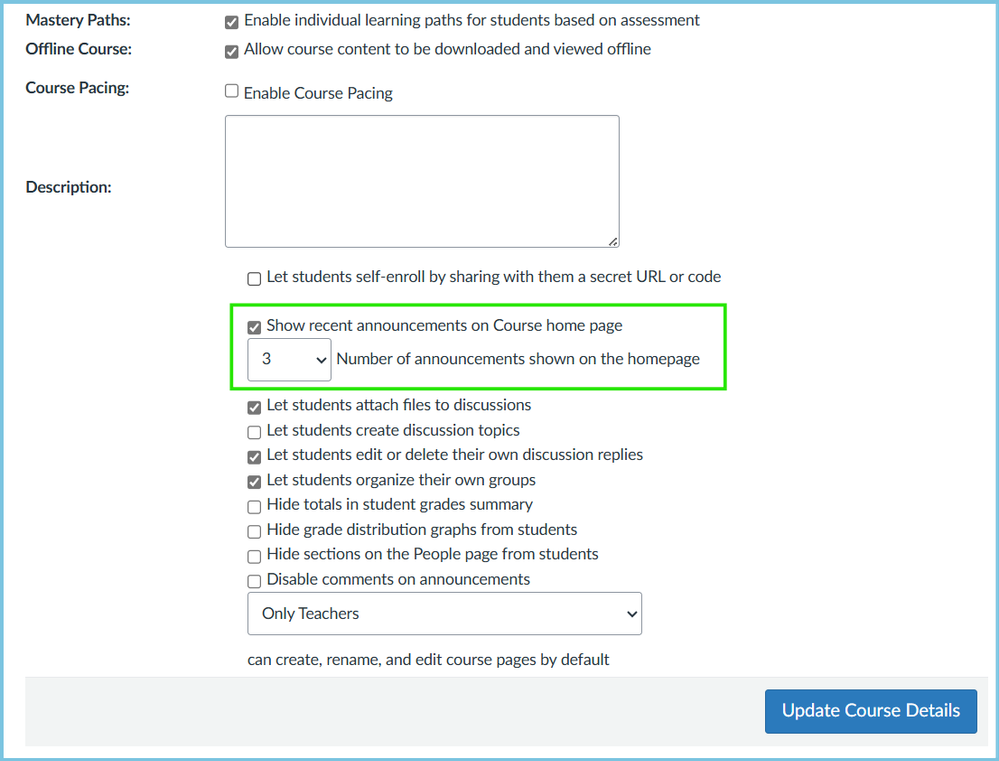
Also, if you look at other courses you have access to...is that setting available in those courses? Or, is it across the board where you cannot access this setting in any of your courses?
I wonder if your school's Canvas administrator(s) have somehow blocked that setting so that you cannot use it? I guess it might be possible via some back-end code, but I'm really not sure if this would be possible or not. And, I don't know the reasons why anyone would want to disable this setting...since it's optional for everyone. Maybe have a conversation with your school's Canvas admin team (usually in their Online Learning / eLearning / Distance Ed department)?
As a last resort, you might need to reach out to Canvas Support. They may be able to look at things in more detail for you. How do I get help with Canvas?
Good luck! Please come back to this topic if you've been able to find a solution locally at your school.


