Hello @sherry_kull ...
I *think* you may be adding an unnecessary step to your process. Let's see if we can simplify things for you in the New RCE. In my own sandbox course, I tested this out, and it works as expected. I had a page with a link to the Yahoo.com website. When I edited the page in the New RCE, I left-clicked on the link, and I got a little pop-up menu:
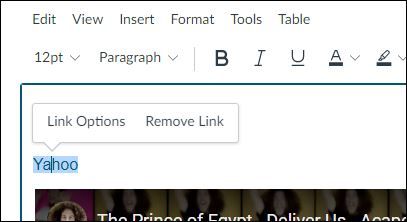
Instead of clicking on "Remove Link", I can click on "Link Options", and then a slide-out menu appears on the right side of my screen. It allows me to change the link to whatever I want, and then I click on "Done".
Alternatively, if you don't select "Link Options", you can highlight the entire link and then press Ctrl + K on your keyboard. This will bring up an "Insert Link" window where you can change the link to whatever you want.
I hope this will be of some help to you. Please let Community members know if you have any other questions about this...thanks! Take care...be well.




This discussion post is outdated and has been archived. Please use the Community question forums and official documentation for the most current and accurate information.