Hi Laura @lgarmire ,
I have 2 suggestions. I'll give the best one first.
Suggestion 1. Switch to using the details tag. It will work in the mobile apps too. So your example becomes:
<details><summary>Click to reveal the secret to success</summary>
<p>Hard work at the start pays dividends at the end</p> </details>
And the details tag is accessible-- read by screen readers as "button - collapsed" before it's activated.
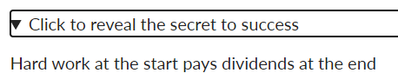 Details expanded
Suggestion 2. Hide the whole widget on the mobile screen because pop-ups do not work there. So your example becomes:
<div id="widget" class="visible-desktop" style="display:none;">
<div id="dialog_for_link1" class="enhanceable_content dialog">Hard work at the start pays dividends at the end</div>
<p><a id="link1" class="Button" href="#dialog_for_link1">Click to reveal the secret to success</a></p>
</div>
Surrounding it in another div that is only visible in the desktop. The caveat here is that in the RCE you will not see the widget either, so you'll need to be in HTML mode if you want to make further adjustments to it. This widget is also still accessible to the screen-reader.
Never mind suggestion 2 unless you really want the modal window. Go with the details tag solution. You can also add some styling to the summary tag and make it look fancy!
Cheers - Shar ⭐


This discussion post is outdated and has been archived. Please use the Community question forums and official documentation for the most current and accurate information.