The Instructure Community will enter a read-only state on November 22, 2025 as we prepare to migrate to our new Community platform in early December.
Read our blog post for more info about this change.
Someone already created some Sub Accounts ( Departments) in our Canvas Portal, and here is my question:
- Can I find out what that account_id is so I can add that line to my account.csv file?
- When creating sub-account in UI, there is no way to add the account_id, only NAME
- Is there a way to batch-create more than 1 sub-account?
Thanks everyone
Solved! Go to Solution.
Quan,
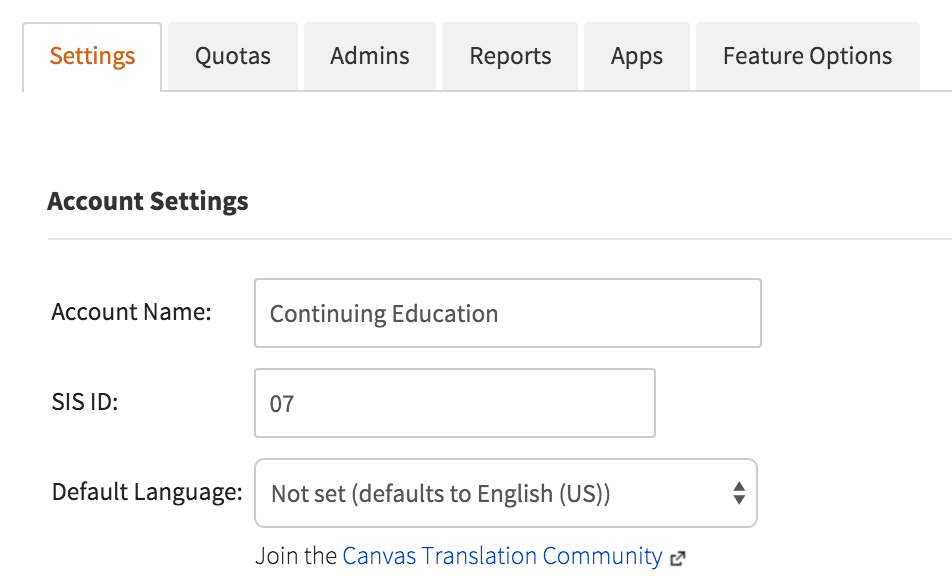
You will want to go one step further when you access the sub-account. Click on the Settings for that sub-account and look at the SIS ID value. This will give you the account_id value to enter for the csv file import. At my institution, each college code from our SIS was used as the account_id (or SIS ID) for Canvas.
This is an example:
Best,
Shane
If you're an admin, you can click on the managed account within the admin tab of your instance of Canvas. The account id appears in the URL: YOURDOMAIN.instructure.com/accounts/YOUR_ID
This is how I understand it. Someone please chime in if there's a simpler way! I apologize; I can't help you on your other questions. I will defer to other experts in the field.
Hi,
This is the sub account ID not the individual admin account ( SIS ID)
Thanks for your answer
You should be able to do this for sub-accounts in the same way. Click on the sub-account in Canvas, and the id appears in the URL.
Hi Brian
Here is what I got https://ohlone.instructure.com/accounts/36
So on the csv file I will this number 36 to add new Sections to this Sub-account ( department) ?
Here is an example of what we have
| course_id | short_name | long_name | account_id | term_id | status | start_date | end_date |
| QUAN-101A | 101A LAB U | QUAN-101A LAB | ?????????? | active |
Quan,
You will want to go one step further when you access the sub-account. Click on the Settings for that sub-account and look at the SIS ID value. This will give you the account_id value to enter for the csv file import. At my institution, each college code from our SIS was used as the account_id (or SIS ID) for Canvas.
This is an example:
Best,
Shane
Thanks Shane, that is what I just found out too. It is great
Thank you Shane. I apologize to all; I was misinformed.
Thanks for the helpful reply especially with the screenshot. I discovered that an SIS ID can be entered if that field is blank. Nice!
@qnguyen , as this is very much a question for admins, I'm moving it to the Canvas Admins group. If you're not already a member of that group, joining is just a few clicks away.
Quan ---
If you want to do this programmatically, you'll need to use the API.
Particularly the Accounts - Canvas LMS REST API Documentation "Get Subaccounts for an account" method.
Basically, you start by passing in account_id = 1, and then get the sub accounts for it. Then traverse through the returned list, and for each of those, do another call to get the sub-accounts of those (rinse and repeat).
Let me know if this doesn't make any sense, and i might be able to show some code snippets of how im doing it.
Community helpTo interact with Panda Bot, our automated chatbot, you need to sign up or log in:
Sign inTo interact with Panda Bot, our automated chatbot, you need to sign up or log in:
Sign in
This discussion post is outdated and has been archived. Please use the Community question forums and official documentation for the most current and accurate information.