2020 Course Design Essentials: Design Asset Package Templates to Personalize your Canvas Courses

 Laurie_Norris
- Subscribe to RSS Feed
- Mark as New
- Mark as Read
- Bookmark
- Subscribe
- Printer Friendly Page
- Report Inappropriate Content
September Teacher Appreciation Event: Design Asset Package Templates to Personalize your Canvas Courses
• About our event
• About our Design Asset Package Templates
• Button Giveaway!
We are part of Instructure’s Learning Services Team! More specifically, we are Kimberly Ellis, Shalon Farris, Tiffany Foster, Laurie Norris, Miranda Madigan, Rosina Monteiro and, led by our fearless leader, Deonne Johnson. We are Canvas users and have been students, teachers, admins, trainers, consultants, and instructional designers. We have created fully-online, hybrid/blended, and face-to-face courses for learners ranging from preschool through post-secondary and everything in between.
We utilize the Canvas Community on a regular basis to position instructional design resources! We understand the impact and power of the Instructional Designers' space within the Community and want to give back. We are excited to collaborate and share tips and tricks about our Canvas Design Best Practices.
The beginning of a new school year is always exciting and this year is just a little bit different for everyone. As teachers are rethinking how they deliver content and how they can better reach their students, personalization is an important element for building relationships and establishing a meaningful learning environment. Canvas provides the perfect platform for customizing your courses using relevant tools and rich editing options. The visual elements in a course can bring that added touch of personalization and can humanize learning by engaging students in a compelling online experience.
- Are you looking for a fresh look to catch (and keep!) your student’s attention?
- Do you want to ramp up the visual elements in your course to increase the relevance of content and improve motivation?
- Are you ready for some unique designs that will elevate your course by incorporating badges, animations, and professional graphics?
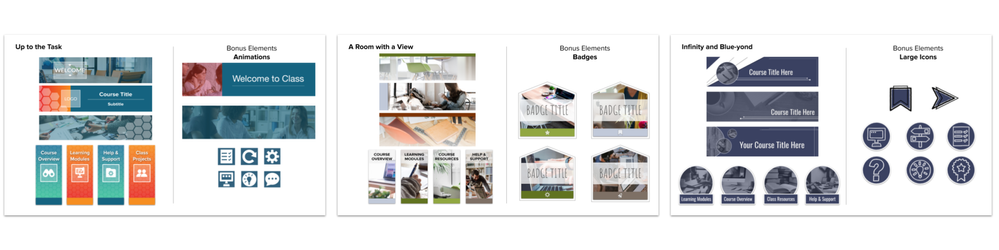
Take a look at the all-new Design Asset Package Templates offered by the Instructional Design team at Instructure! Design Package Templates include sets of graphic assets that are available to Canvas clients to supplement their existing Canvas templates or courses. These Design Package Templates provide clients with a variety of styles and graphics to supplement course design and provide ready-to-use images that will complement course content. Each package includes three sets of designs and each set contains a collection of banners, buttons, and bonus elements. The bonus elements vary per package and include elements such as stickers, large images, badges, or animated graphics.
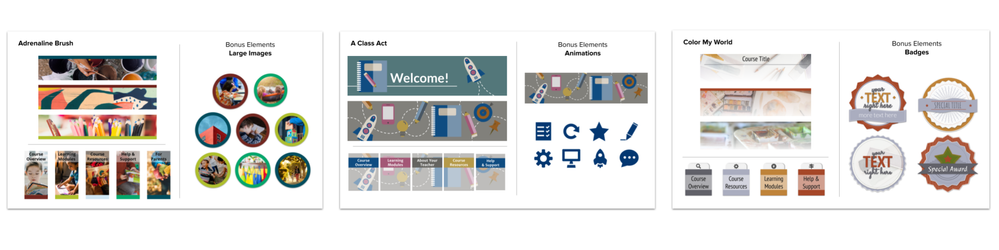
Teachers, instructional designers, and course instructors will love having beautiful visual elements to customize and personalize their courses, enticing learners in a welcoming and engaging learning community. Visit our Ready-Made Template Suite to view all of our templates and the recent addition of Design Package Templates.
As part of our 2020 Course Design Essentials event, the Instructional Design team is giving away a set of buttons to customize and add to your course for instant personalization. You, the instructor, are the most important part of your student's learning experience. Students want to learn more about you! Use these buttons to add to your course design and humanize learning by fostering a personalized experience for your students.

Button Access
September - 2020 Course Design Essentials Teacher Button Giveaway
Button Installation
- Select the link above to make your own copy of the Google Slide deck that includes four options for Teacher buttons. Choose one of the options, customize with your own picture, and add to any page in your course!
- Follow the instructions on the first slide.
- After you have made your customizations and downloaded your new image:
- Upload the button image files to your Canvas Course page and insert ALT tag to ensure accessibility.
- Select the button to link to the appropriate course content while still editing the page.
- Save your changes.
- Test your new buttons to ensure links are functional.
- Enjoy!
For more information on personalizing learning and Instructure’s Design Package Templates, join the Instructional Design Team on Wednesday, September 9th, 10:30 am (MST), for a Canvas Live Event via your favorite social media platforms (Facebook, Linkedin, Instagram, YouTube, etc.). Recordings of past events can be found on our CanvasLMS YouTube Channel.
We are expanding our offerings and would love to hear your feedback on what you would like to see in course design, module structure, and graphic elements! And - don't forget to check out Dr. Deonne Johnson's blog, "3 Ways to Bring More Humanization into Your Online Courses"
Follow us for our full event! We can't wait to continue sharing with you!
Please comment below. We’d love to hear from you!
Our Instructional Design team offers templates, consultation, badging services, course evaluations, workshops, and more. If you would like to learn more about our services, please contact your CSM or @deonne_johnson, Manager, Learning Services, via djohnson@instructure.com
You must be a registered user to add a comment. If you've already registered, sign in. Otherwise, register and sign in.