Hi @Tim04 ...
Unfortunately, what you've posted would not work for the needs of @rdibenedetto144. As an example, I tried what you suggested in my own sandbox course using a page that had multiple paragraphs of text on it. The original page looks like this:
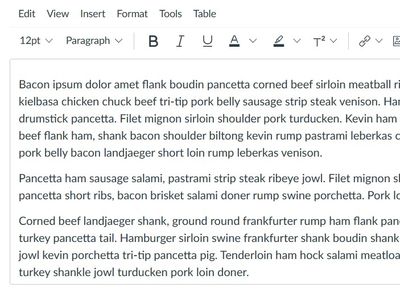
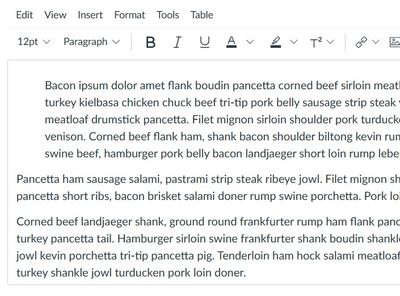
However, when I use the "Increase Indent" option provided in the RCE (Rich Content Editor), the entire paragraph indents. What @rdibenedetto144 is asking for is only the first line of the paragraph. @kona is correct that HTML operates differently than using something like MS Word to write an essay paper where you can clearly see an indentation on the first line only of a paragraph.
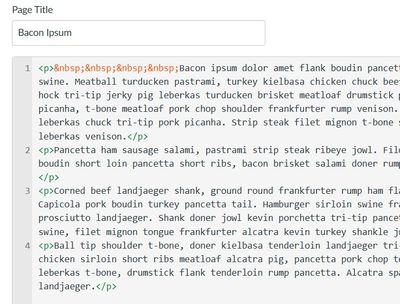
If one were familiar with HTML, he/she could go to the HTML side of the page and insert some non-breaking spaces before the first word of the paragraph (as shown in the orange text).
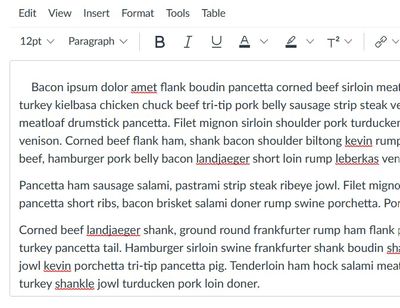
The result would look something like this:
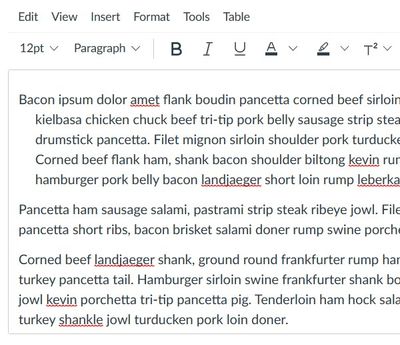
The link that @kona provided has a response I gave quite a while ago that has some other code you could use...but that code does the exact opposite. It creates a hanging indent...meaning the first line stays where it is, and then any additional lines in the paragraph beyond the first line indent...like this:
I hope this helps to clarify things a bit for you. Sing out if you have any other questions about this...thanks!





This discussion post is outdated and has been archived. Please use the Community question forums and official documentation for the most current and accurate information.