Canvas deploys contain code changes that are intended to fix bugs, improve performance, and prepare for new features. These deploys take place every two weeks and can be tested in the beta environment before the production deploy date indicated in the title of this document.
Deploy notes indicate notable changes in the deploy by feature. To view functionality according to user role, please see Canvas Features by User Role.
Fixed bugs are located in Known Issues. For related issues resolved in this deploy, view the 2022-06-08 Known Issues tag.
- Subscribe to the deploy notes page to be notified of posted deploy notes
- For Canvas Platform Service changes (API, GraphQL, Canvas Data), please see the appropriate page in the Change Log
- Other questions? Visit the Canvas Deploy FAQ
|
Deploy Notes Change Log
BACK TO TABLE OF CONTENTS
Rich Content Editor
Vector Button in Equation Editor
Summary
In the Rich Content Editor, a vector button has been added in the Equation Editor.
Change Benefit
This change allows instructors and students to include vector arrows with a button when creating an equation in the Rich Content Editor Equation Editor.
Feature Workflow
 Equation Editor Icon
In the Rich Content Editor, click the Equation Editor icon.
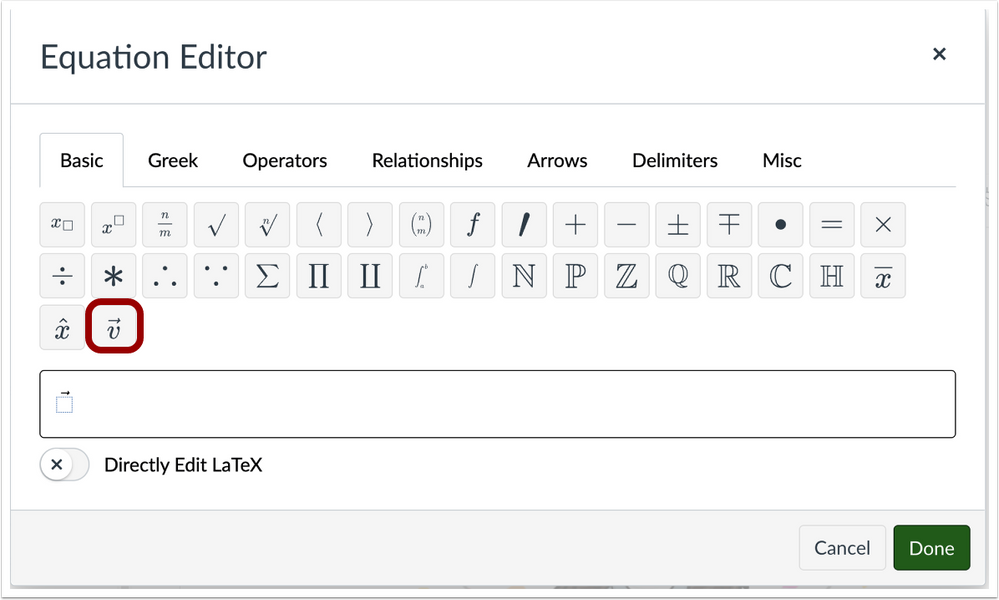 Rich Content Editor Equation Editor
To create an equation with vector arrows, click the Vector button.
Syllabus
Icon Display in Syllabus Update
Summary
In the Syllabus, users can view updated icons for assignments, discussions, and quizzes in the Course Summary.
Change Benefit
This update allows users to differentiate between assignment, discussions, and quiz icons in the Syllabus Course Summary.
Feature Workflow
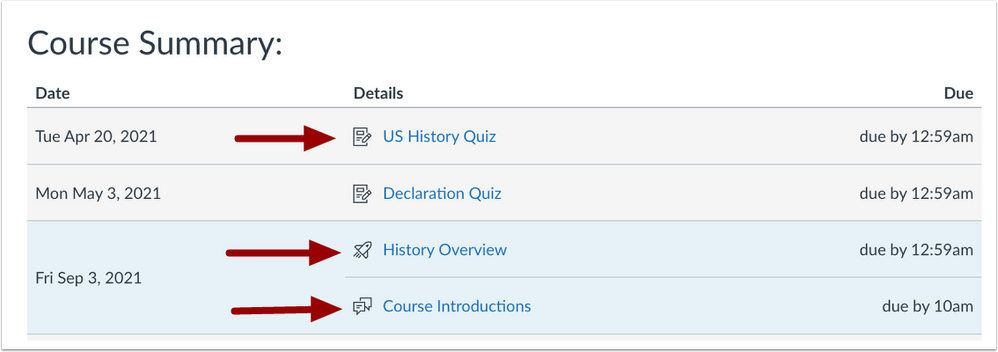 Syllabus Course Summary
In the Syllabus, different icon symbols display for assignments, discussions, and quizzes.
Additional Details
Previously, assignments, quizzes, and graded discussions displayed the same assignment icon in the Syllabus.
BACK TO TABLE OF CONTENTS
Account Settings
Developer Key Account Binding
Summary
In Account Settings, administrators can add an LTI tool to a subaccount using the ClientID established by creating the developer key in the root account.
Change Benefit
This update allows administrators to install LTI tools in each subaccount using the same developer key.
Feature Workflow
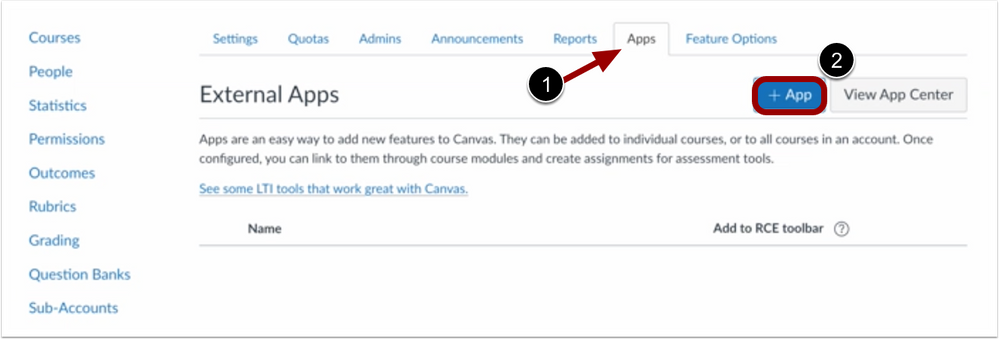 Account Settings Add Apps
In Account Settings, click the Apps tab [1]. To add an LTI tool, click the Add App button [2].
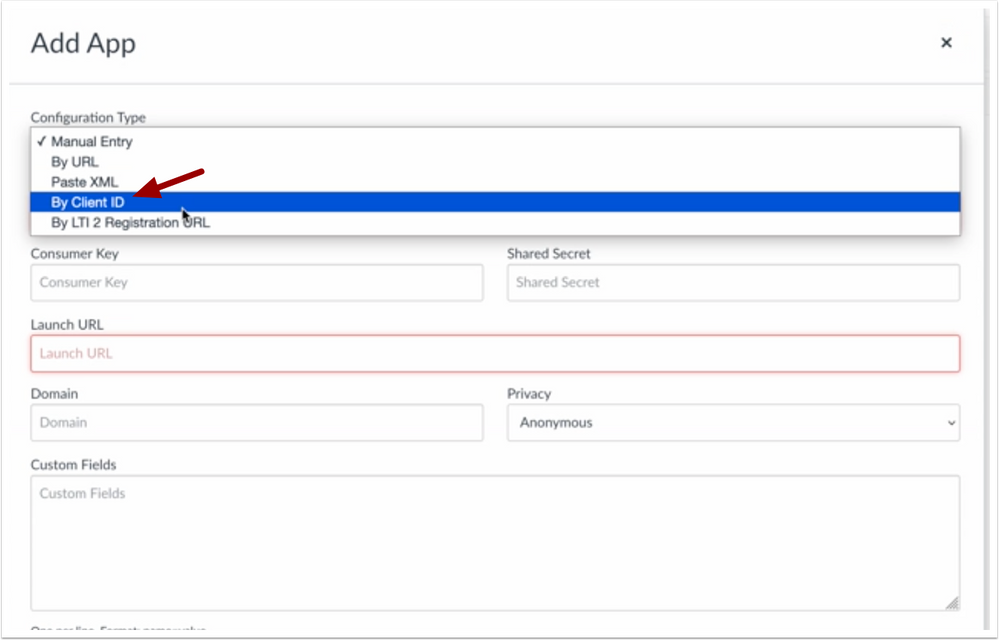 Configuration Type drop-down menu
To select the configuration type, use the Configuration Type drop-down menu and select the By ClientID option.
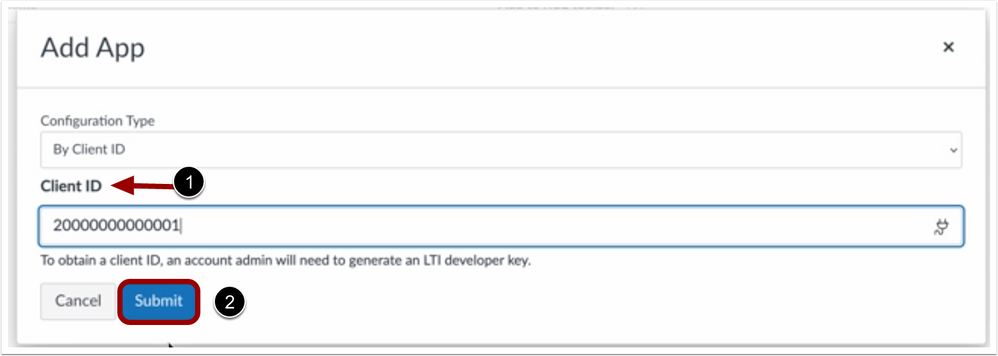 Add App ClientID
Enter the Client ID [1]. Click the Submit button [2].
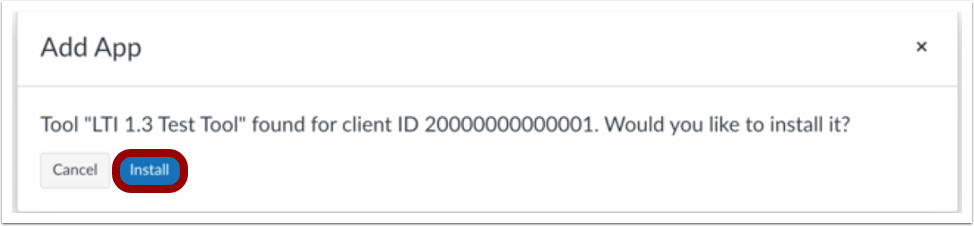 Add App Install
To add the tool to the External Apps list, click the Install button.
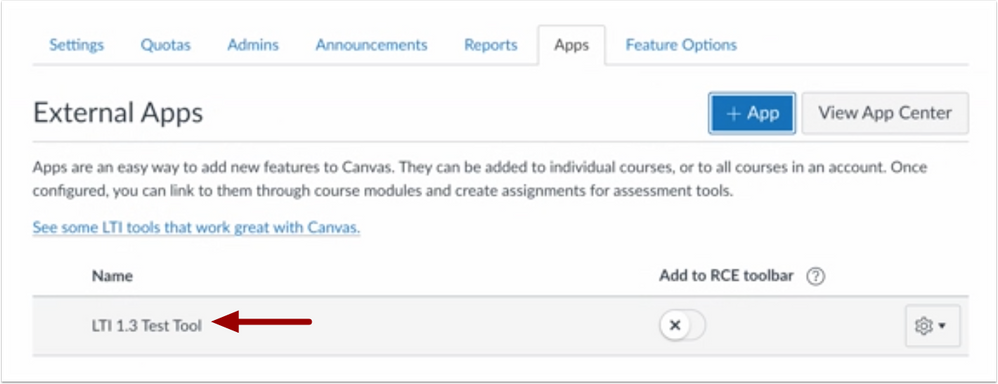 External Apps Page
When the LTI tool is added successfully, it displays in the External Apps page.
Additional Details
This update does not guarantee the tool will pass information correctly between root accounts and subaccounts or between different subaccounts of the same root account.
BACK TO TABLE OF CONTENTS
Courses
New User Tutorial Description Update
Summary
In Accounts Settings, the New User Tutorial Feature Option description has been updated to include which users are affected by this feature.
Change Benefit
This update allows administrators to identify that new instructors are the only users affected when the New User Tutorial feature option is enabled.
Feature Workflow
 New User Tutorial Description
In Account Settings, the New User Tutorial description has been updated.
Rich Content Editor Icon Maker
Single Color Image Color Picker Update
Summary
In the Rich Content Editor Icon Maker, instructors can edit the color of a single color image on a button after saving with the Single Color Image Color Picker.
Change Benefit
This update allows instructors to edit the color of a single color image on a button after saving.
Feature Workflow
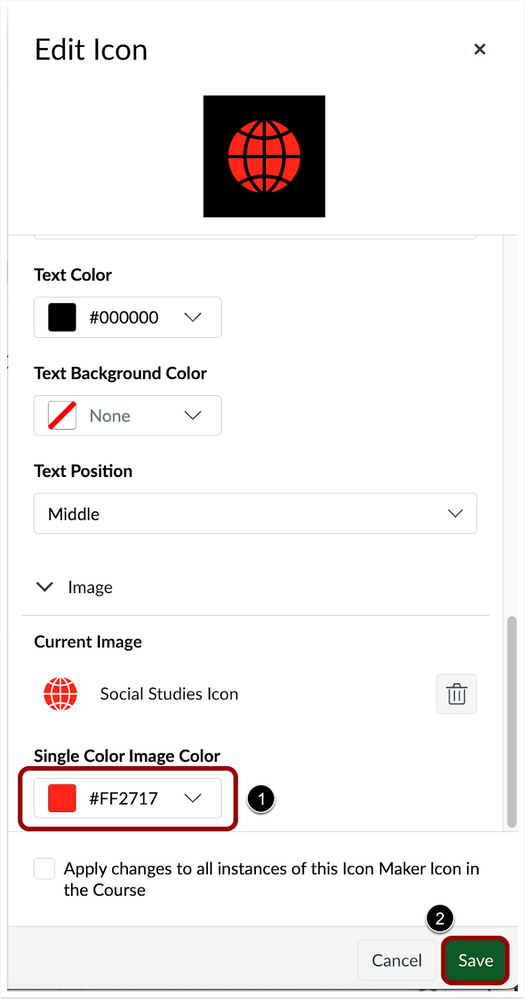 Rich Content Editor Icon Maker Editor
In the Single Color Image Color drop-down menu, instructors can edit the color of a single color image.u [1]. To save the image color, click the Save button [2].
Additional Details
Previously, the color of a single color image on an button could not be modified once saved.
Deploy Notes Change Log
BACK TO TABLE OF CONTENTS
| Date |
|
| 2023-02-07 |
Updated Feature
- Rich Content Editor Icon Maker: Single Color Image Color Picker Update
- Changed Subaccount Configuration to No
|
| 2022-05-27 |
Published Deploy Notes |

