In this Canvas release (September 18), two new granular permissions have been created in the permissions page.
Feature Previews
The Improved Outcomes Management feature replaces current outcome listings in accounts and courses with a better creation, navigation, search and import experiences.
|
Screencast | View the New Feature Screencasts page for a compilation of all available videos in this release.
All Resources | Features in this release may be included in product blogs and other content areas. For all related links, view the 2021-09-18 Community tag.
|
Release Notes Change Log
Back to Table of Contents
Permissions
Manage Assignments and Quizzes Granularity
Summary
The Assignments and Quizzes - add / edit / delete permission has been grouped into three separate permissions.
Change Benefit
This change provides more granularity for managing assignments and quizzes. Additionally, this permission does not affect discussions, which are managed separately.
Affected User Roles
Admins
The Assignments and Quizzes - add / edit / delete permissions are grouped in the permissions list as the Manage Assignments and Quizzes.
As with other permissions, the row displays icons that represent the permission status for the user role. All permissions within the group can be managed together by clicking the main icon for an account user role.
 Manage Assignments and Quizzes Permission
To manage individual permissions within the group, the group can be expanded. Each granular permission that is enabled includes a check mark. Individual permissions for the group can be managed by selecting or deselecting the relevant permission. When the permission includes a mix of enabled and disabled permissions, the main permission status indicates the permission is partially enabled, using a half-filled green circle as the icon.
Individual permissions for a user role can be changed to the full enabled or disabled state at any time by changing the status for the main permission.
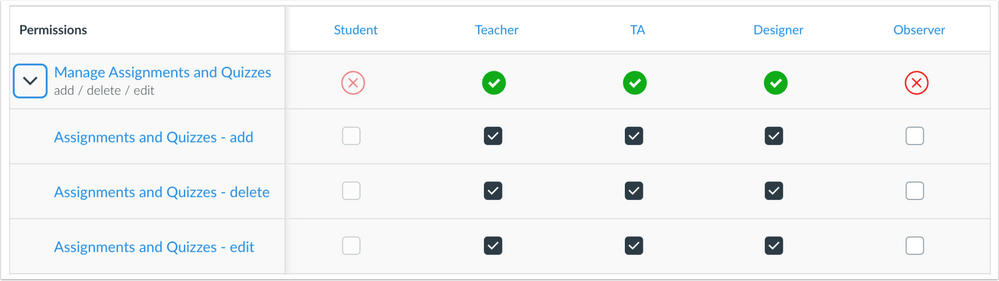 Manage Assignments and Quizzes Permission Expanded
Manage Groups Granularity
Summary
The Groups - add / edit / delete permission has been grouped into three separate permissions.
Change Benefit
This change provides granularity in managing courses. This update does not affect Canvas APIs.
Affected User Roles
Admins
The Groups add, edit, and delete permissions are grouped in the permissions list as the Manage Groups permission.
As with other granular permissions, the row displays icons that represent the permission status for the user role. All permissions within the group can be managed together by clicking the main icon for an account user role.
 Manage Groups Permission
To manage individual permissions within the group, the group can be expanded. Each granular permission that is enabled includes a check mark. Individual permissions for the group can be managed by selecting or deselecting the relevant permission. When the permission includes a mix of enabled and disabled permissions, the main permission status indicates the permission is partially enabled, using a half-filled green circle as the icon.
Individual permissions for a user role can be changed to the full enabled or disabled state at any time by changing the status for the main permission.
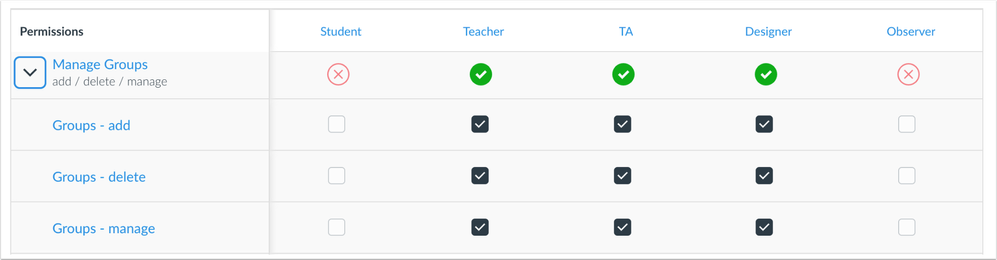 Manage Groups Permission Expanded
Back to Table of Contents
Feature previews allow institutions to preview Canvas functionality and participate in the Canvas development process using the Canvas environment of their choice (beta, production, or test, according to environment availability). Preview functionality is eventually incorporated into Canvas for all users at a future date.
Unless otherwise noted, feature previews are opt-in and do not require any action by a Canvas admin until a feature’s enforcement date is announced. Please reference the table below each feature heading for specific feature information. For general information about feature previews, please see the Canvas Release Notes FAQ.
Outcomes
Improved Outcomes Management
Summary
The Improved Outcomes Management feature replaces current outcome listings in accounts and courses with a better creation, navigation, search and import experiences.
Change Benefit
This change helps administrators and instructors make more meaningful decisions as they import, organize, and edit outcomes in their account and courses.
Additional Details
For full details about this feature, please see the Canvas Feature Preview: Improved Outcomes Management document.
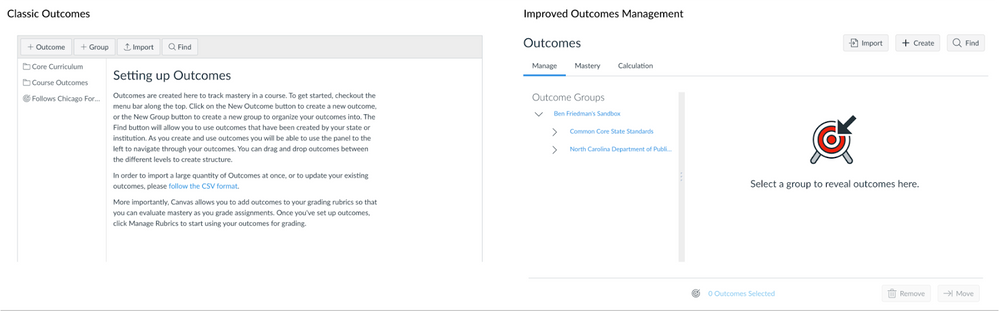 Classic Outcomes vs Improved Outcomes Management
Deploy Notes Change Log
BACK TO TABLE OF CONTENTS
| Date |
|
| 2021-09-21 |
Changed—Feature Previews
- Outcomes: Improved Outcomes Management is restored in the production environment
|
| 2021-09-17 |
Changed—Feature Previews
- Outcomes: Improved Outcomes Management delayed in the production release; the feature is still available for testing in the beta environment
|
| 2021-09-09 |
Changed—Updated Features
- Permissions: Manage Assignments and Quizzes Granularity
|
| 2021-08-26 |
Removed—Updated Features
- Rich Content Editor: Accessibility Checker Notification enforcement (this feature is still available as a feature preview until further notice as introduced in the Canvas Release Notes (2021-08-21) )
|
| 2021-08-23 |
Published Release Notes |

