Hi community.
I am creating a little addon to our Calendar events that allows people to click a button to register for a session. My script works just the way I want it in the full calendar event view because I can simply use:
$(document).ready(function() and document.getElementById("my-button-id") and onclick etc.
But I'm running into problems with this popup view that Canvas provides when you click the event in the calendar:
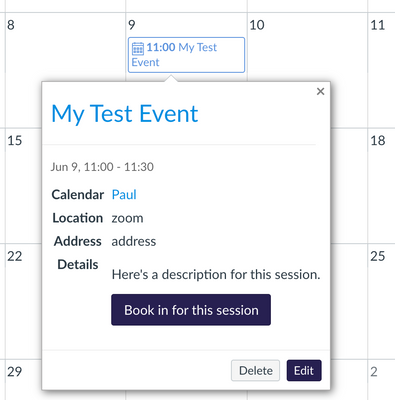
The event HTML including my button element is added dynamically to the DOM when the user clicks onto the calendar event. The element didn't exist when the $(document).ready(function() event happened, so the code breaks.
The code provided here got me a step further:
https://github.com/unsupported/canvas/blob/master/branding/javascript/on_element_rendered/on_element... (@whoever provided this - thank you!)
But it only works once. If the user opens the little popup version of the event and closes it again, it no longer seems to work.
Then I found a possibly more modern approach - MutationObserver https://developer.mozilla.org/en-US/docs/Web/API/MutationObserver but I think I'm a bit out of my depth there.
I feel like I am just over-complicating the whole thing and I'm probably just missing a simpler way to accomplish this.
TL;DR - how can I watch for a button click on a button that sits in dynamically loaded content?
Now this would be easy if I could put the onClick event directly into the button! 🤣




