@chriscas
Hiding things works for the majority of people, but since it really just makes and API call, a determined person could get around it. With that in mind, determine who you are trying to keep from using it. If you are okay with just disabling it for mouse users and letting keyboard users still use it, then you can use the pointer-events:none to disable a checkbox through CSS. You can use the ::after pseudo-class to add content.
form#migrationConverterContainer label[for="dateAdjustCheckbox"] {
  pointer-events: none;
  color: #ccc;
}
form#migrationConverterContainer label[for="dateAdjustCheckbox"]::after {
  color: #000;
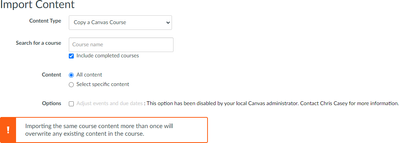
  content: ": This option has been disabled by your local Canvas administrator. Contact Chris Casey for more information.";
}
That's just for the import content screen, you would need to do something similar for the copy course content screen.
Here's what it looks like. The checkbox is still there, you just can't click on it. Yes, you can still use the keyboard to select it, but how many people are going to do that in the first place and especially after seeing the note to contact their local admin?
If you needed to manipulate it through JavaScript, then yes, I would use a mutation observer.





This discussion post is outdated and has been archived. Please use the Community question forums and official documentation for the most current and accurate information.