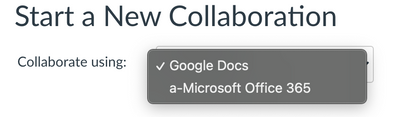
I'm assuming this is because it lists them alphabetically. I did a little experiment. If you go to Admin->Settings->Apps->View App Configurations, then edit Google, you can change the name. So I modified the name of Google Apps--added a tilde (~) in front. The ~ is near the bottom of the ASCII table, so it *should* be at the bottom. However, that also turned out to not be the case for listing. Finally, I modified the Google Apps with an x in front - xGoogle Apps. I returned to my collaborations, and Microsoft Office 365 appeared near the top, with xGoogle Apps underneath.
If you don't want to do this, you can uncheck the Collaboration placement on Google Apps as well. It will remove that option from the Collaborations list. Then when you create a collaboration, it will automatically choose Office 365, no drop-down even shows up. If you check the placement for Google Apps without altering the name, it goes to the top of the list again.





This discussion post is outdated and has been archived. Please use the Community question forums and official documentation for the most current and accurate information.