In SpeedGrader when reviewing Multiple Dropdown type questions for a quiz created with Classic Quizzes, it has come to our attention that not all of the dropdown boxes will show in SpeedGrader view. The dropdown boxes will show for the student when taking the quiz and they will show in the Preview of the quiz, but the dropdown boxes do not always show in SpeedGrader.
I have tested in Firefox, Chrome, and Safari and received the same result.
Here is an example of the test preview of what the questions look like while taking the exam:
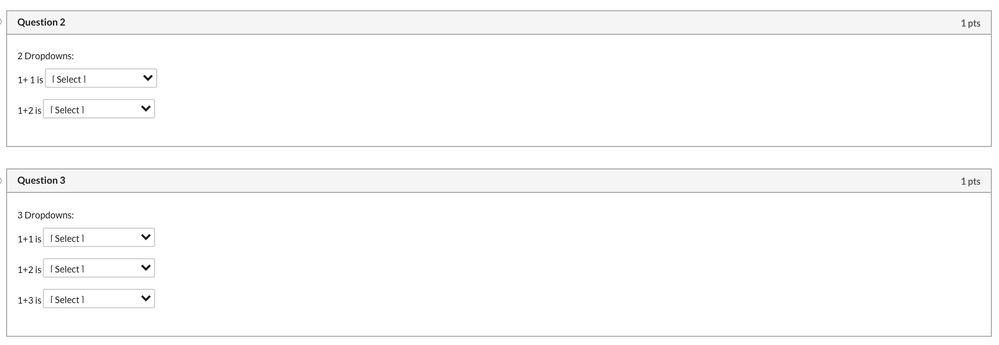
And here is what it looks like in SpeedGrader:
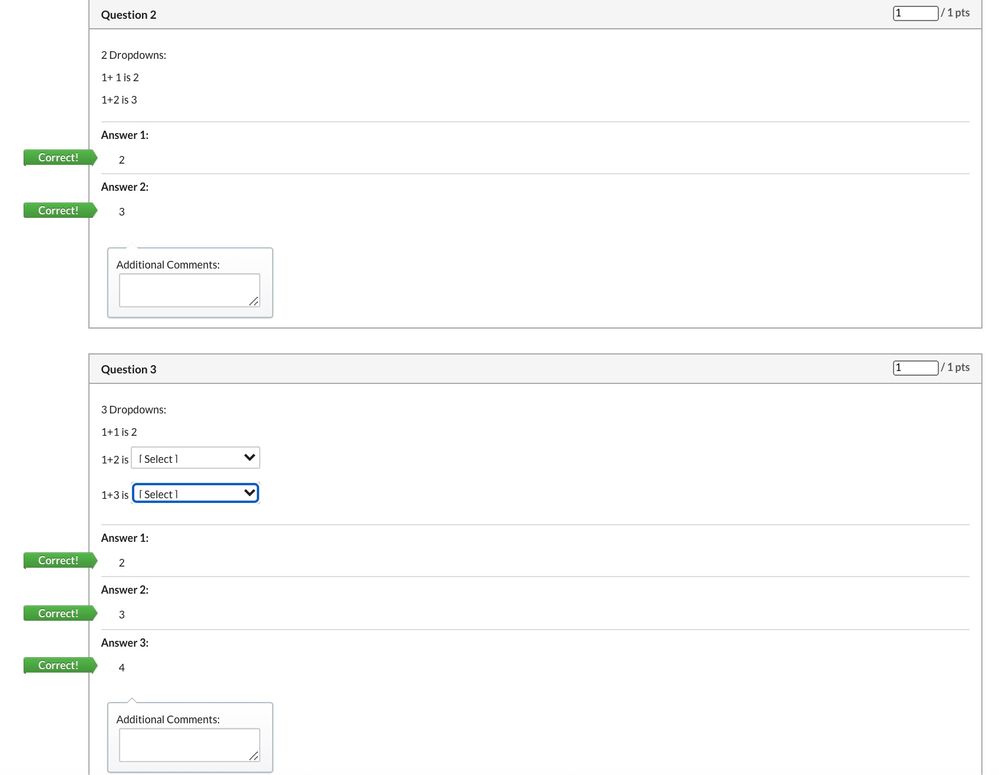
As can be seen in the second image, Question 2 the dropdown boxes do not show at all and in Question 3 they only show for two of the three places where they should be.
Initially in our testing we thought it was related to how many boxes were in a question, but I've come to find that does not seem to affect whether this issue appears or not.
Because the student is able to see the dropdown boxes on their end to answer the questions and the instructor can see how the student answered in SpeedGrader even without the boxes this isn't a huge issue. It's more of a question of why is this happening in the first place and can it be fixed.
Has anyone else experienced this issue and know how to resolve it?









This discussion post is outdated and has been archived. Please use the Community question forums and official documentation for the most current and accurate information.