The Instructure Community will enter a read-only state on November 22, 2025 as we prepare to migrate to our new Community platform in early December. Read our blog post for more info about this change.
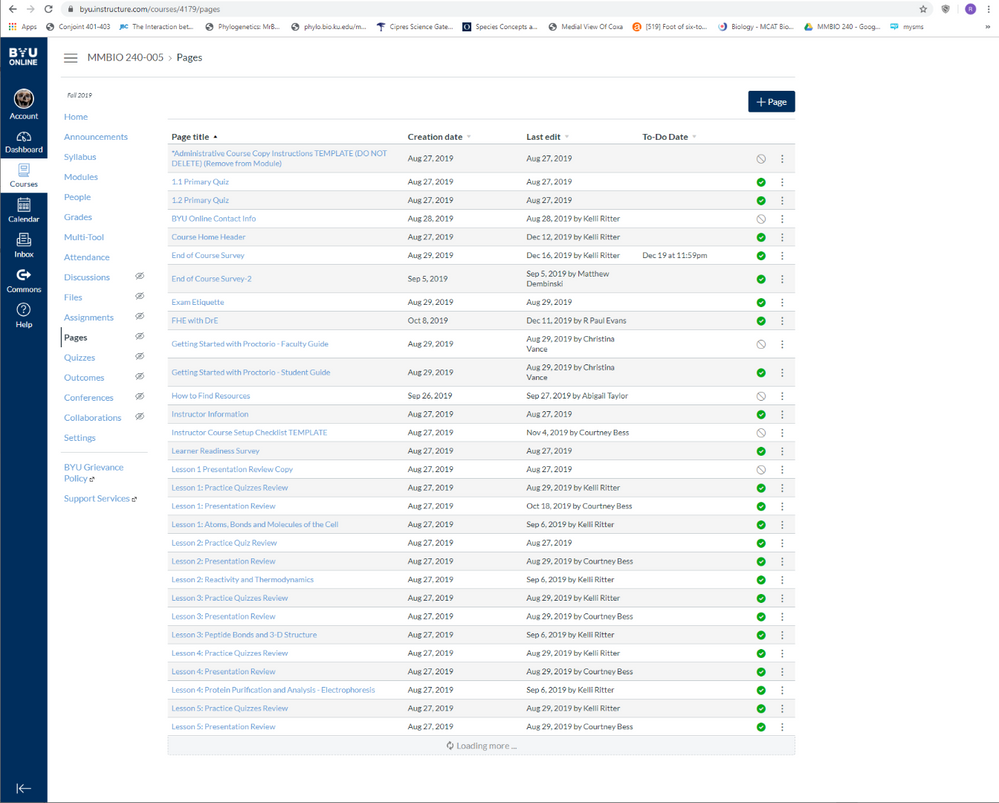
Trying to view all of my pages from Pages. Only the first 30 display with a "Loading more..." rotating circle at the bottom. After 30 minutes, nothing more has displayed.
Chrome/Windows 10 rebooted twice. Cleared cache and cookies twice.
Solved! Go to Solution.
@evansp
I'm sorry to hear that this issue is still plaguing your navigation experience. I just navigated to the URL displayed in the screenshot, and what I believe is the full page list loaded within seconds. The last page on the list is titled "Welcome to BYU Online."
If you haven't yet, would you please use the Report an Issue support option on the BYU Canvas Info & Help menu of your account to ask a support agent to have a look at your environment?
Thanks.
Hello @evansp ...
I'm not sure I have an answer for you, but I do have a handful of questions:
1. Google browser up to date
2. No plug ins – vanilla set up
3. Canvas support handled by university; no response
4. Same result with Firefox and Bing
Thanks for asking
Have you tried on your home computer/mobile data as well? It could be an issue with your school's network.
Same where ever.
@evansp
We're following up on some old unresolved questions. Did you ever find out what was causing this? Is it still occurring?
Still occurring. No cause identified. Still unresolved...
@evansp
I'm sorry to hear that this issue is still plaguing your navigation experience. I just navigated to the URL displayed in the screenshot, and what I believe is the full page list loaded within seconds. The last page on the list is titled "Welcome to BYU Online."
If you haven't yet, would you please use the Report an Issue support option on the BYU Canvas Info & Help menu of your account to ask a support agent to have a look at your environment?
Thanks.
The issue was documented and sent for support agent help six months ago. No response.
@evansp
You mentioned earlier that initial requests for support are handled locally by your institution; would you follow up with them to confirm that they escalated the request to Canvas Support for additional investigation—and if they have, please ask them for the case number associated with your ticket and post it here so we can follow up?
Thanks.
Will do. Ironically, it was my institutional support who suggested that I resolve this issue through the LMS Community. So, I will take it back to BYU Canvas Support to send up via a different flag pole. I told BYU Canvas Support that I would send the issue to LMS Community as they requested, but, that my experience is that LMS Community can, at times, function only as an echo chamber. I hear what I said coming back...
@evansp , the Canvas Community is a member-to-member forum. People who participate here can offer general suggestions such as "did you try a different device?" or "yes, that happened to me as well, and this is how I resolved it" or "I am not able to reproduce it," but don't have access to the metadata that support agents use to resolve specific issues such as yours.
Community helpTo interact with Panda Bot, our automated chatbot, you need to sign up or log in:
Sign inTo interact with Panda Bot, our automated chatbot, you need to sign up or log in:
Sign in
This discussion post is outdated and has been archived. Please use the Community question forums and official documentation for the most current and accurate information.