Good afternoon, @ccorbett ...
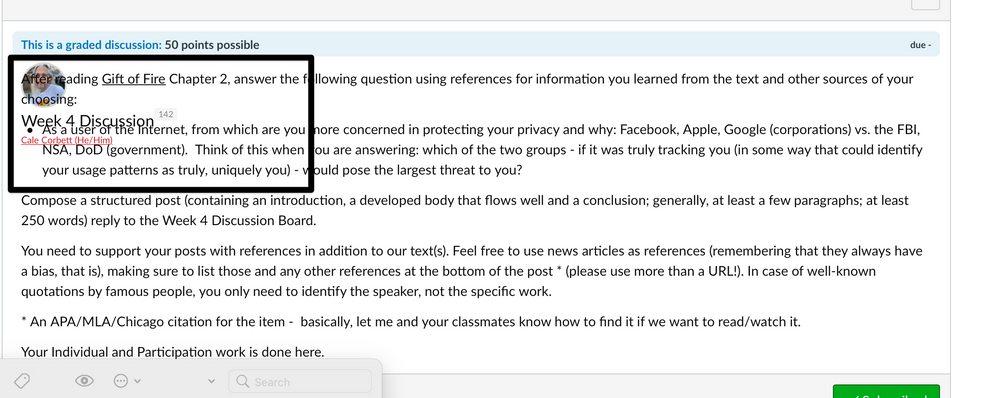
Wow, that's super strange! By chance, have you looked at the HTML for that text on your page to see if you can find anything that might be causing the overlapping? It might be there is some rogue HTML code on the page that is causing this, and maybe there are some things that can be cleaned up. It looks like, for the most part, there's nothing too out of the ordinary about the text you have for that discussion topic. It looks like you're using some basic text formatting at times such as underlining and maybe even a text heading (or is "Week 4 Discussion" your discussion topic title? It's hard to tell.).
Back in December of 2018, I wrote a short blog post here in the Community called: HTML Cleanup. You might want to check it out, give it a try, and see if the steps I've outlined in that post help to fix the issues you are experiencing in your own discussion topic. You could also paste in the cleaned up code into a new discussion topic (separate from the one in question) that isn't yet published...so that you can make sure that things are working correctly before you make it "live" to your students.
Please keep us posted on this...and hopefully a little massaging of your HTML code will be the answer to this. Take care, stay safe, and be well.




This discussion post is outdated and has been archived. Please use the Community question forums and official documentation for the most current and accurate information.