The Instructure Community will enter a read-only state on November 22, 2025 as we prepare to migrate to our new Community platform in early December. Read our blog post for more info about this change.
Using the new RCE and it appears the ability to easily wrap text around a picture no longer works. I used to be able to click the picture then left align, and it would wrap. I cannot get it to work now. Was this feature removed?
Solved! Go to Solution.
Hello there, @kburkes ...
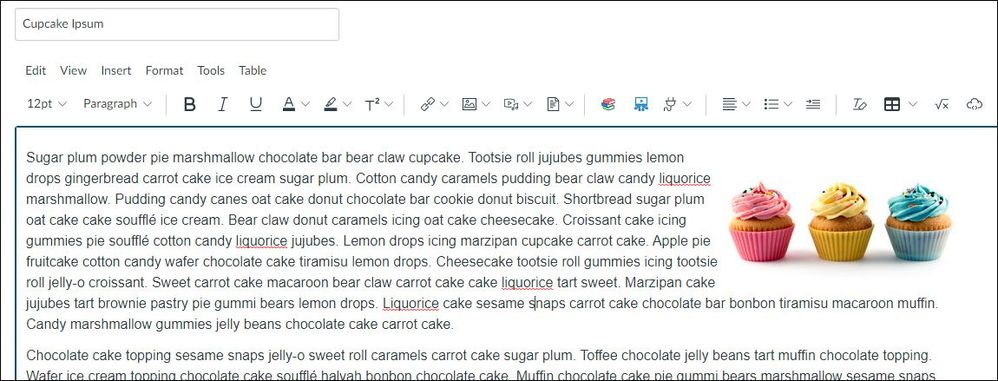
I did some testing in my own sandbox course. I created a new page, put some pizza ipsum (who doesn't like pizza, right?) text in it, and then I added an image right before the first word of the first sentence. I clicked on the image, and then I clicked the "Align left" button, and I got the following result:
I then clicked on the image again, and this time I clicked the "Align right" button to get the following result:
Is this what you are wanting to do in your own course? Something else?
Hopefully this will help a bit. Let Community members know if you have any other questions about this...thanks!
Hello there, @kburkes ...
I did some testing in my own sandbox course. I created a new page, put some pizza ipsum (who doesn't like pizza, right?) text in it, and then I added an image right before the first word of the first sentence. I clicked on the image, and then I clicked the "Align left" button, and I got the following result:
I then clicked on the image again, and this time I clicked the "Align right" button to get the following result:
Is this what you are wanting to do in your own course? Something else?
Hopefully this will help a bit. Let Community members know if you have any other questions about this...thanks!

Yes, your first picture is what I want.
I have tried it several times, but it doesn't work for me on any browser. Weird.
But that does confirm that the function is still working.
Thanks for replying!
Hello again, @kburkes ...
As a possible work-around, when you are editing the page, try clicking on the image, then click on the button to align to the right of the page. Then, click on the button to left align to the page. Does that work for you? Or, have you tried using the Format >> Align >> Left or Right options from the top of the Rich Content Editor?
Nope that do not work since the text and the picture will "follow" each other. But i solved by putting them in a table and making the frame invincible.
Hi @maria_larsson1 ...
Hmmm...that's strange that it's not working for you. I just tried again in my own sandbox course, and I was able to get the text to wrap around an image that I right-aligned to the page.
I'm glad you got things to work using a table...though tables should mainly be used to hold/display data and not necessarily as a means to design the layout of a page. That must be one awesome table you made, though. I've never heard of an invincible table. 😁
Community helpTo interact with Panda Bot, our automated chatbot, you need to sign up or log in:
Sign inTo interact with Panda Bot, our automated chatbot, you need to sign up or log in:
Sign in
This discussion post is outdated and has been archived. Please use the Community question forums and official documentation for the most current and accurate information.