The Instructure Community will enter a read-only state on November 22, 2025 as we prepare to migrate to our new Community platform in early December. Read our blog post for more info about this change.

Turn on suggestions
Auto-suggest helps you quickly narrow down your search results by suggesting possible matches as you type.
Options
- Subscribe to RSS Feed
- Mark Topic as New
- Mark Topic as Read
- Float this Topic for Current User
- Bookmark
- Subscribe
- Mute
- Printer Friendly Page
Grade book color tab in a students cell

- Mark as New
- Bookmark
- Subscribe
- Mute
- Subscribe to RSS Feed
- Permalink
- Report Inappropriate Content
09-09-2019
05:34 PM
Hi, i am an instructor and would like to know what the blue and green color tab in the grade book cell means?
Thanks, Elaine
Solved! Go to Solution.
1 Solution

- Mark as New
- Bookmark
- Subscribe
- Mute
- Subscribe to RSS Feed
- Permalink
- Report Inappropriate Content
09-10-2019
10:15 AM
Hi @elaine_e_morris - Well, it could be a few different things, but let me start by stating that depending on whether you are using the current gradebook or the New Gradebook, for your future reference there is an explanation on what most colors mean here:
- How do I use the icons and colors in the Gradebook?
- How do I use the icons and colors in the New Gradebook?
However the way you are describing them, I'm also wondering if you may have an assignment where Turnitin was used to check each students' originality? The green and blue colors sound a lot like Turnitin's icons for the similarity report score. I do not have an example of the blue color handy, but if what you are seeing looks something like this:
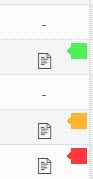
then it's Turnitin. (The above was from the current gradebook, by the way.)
You can verify this by heading to SpeedGrader for that assignment. The color will also show in the upper-right corner along with the % score. The Turnitin site also has a "key" to these colors here: Interpreting the Similarity Report | Canvas Plagiarism Framework From SpeedGrader, you can click directly on the colored icon and be taken to Turnitin's Similarity Report.
Does that help at all, Elaine?
5 Replies
- Mark as New
- Bookmark
- Subscribe
- Mute
- Subscribe to RSS Feed
- Permalink
- Report Inappropriate Content
09-10-2019
10:15 AM
Hi @elaine_e_morris - Well, it could be a few different things, but let me start by stating that depending on whether you are using the current gradebook or the New Gradebook, for your future reference there is an explanation on what most colors mean here:
- How do I use the icons and colors in the Gradebook?
- How do I use the icons and colors in the New Gradebook?
However the way you are describing them, I'm also wondering if you may have an assignment where Turnitin was used to check each students' originality? The green and blue colors sound a lot like Turnitin's icons for the similarity report score. I do not have an example of the blue color handy, but if what you are seeing looks something like this:
then it's Turnitin. (The above was from the current gradebook, by the way.)
You can verify this by heading to SpeedGrader for that assignment. The color will also show in the upper-right corner along with the % score. The Turnitin site also has a "key" to these colors here: Interpreting the Similarity Report | Canvas Plagiarism Framework From SpeedGrader, you can click directly on the colored icon and be taken to Turnitin's Similarity Report.
Does that help at all, Elaine?
- Mark as New
- Bookmark
- Subscribe
- Mute
- Subscribe to RSS Feed
- Permalink
- Report Inappropriate Content
09-10-2019
10:48 AM
Thanks Ken. I appreciate your resources.
Have a great day,
Elaine
- Mark as New
- Bookmark
- Subscribe
- Mute
- Subscribe to RSS Feed
- Permalink
- Report Inappropriate Content
09-10-2019
02:29 PM
Glad I could help, Elaine!
- Mark as New
- Bookmark
- Subscribe
- Mute
- Subscribe to RSS Feed
- Permalink
- Report Inappropriate Content
09-10-2019
06:06 PM
?Thanks Ken,
That was exactly what I wanted to know.
Elaine
- Mark as New
- Bookmark
- Subscribe
- Mute
- Subscribe to RSS Feed
- Permalink
- Report Inappropriate Content
03-28-2021
01:28 PM


 Community help
To interact with Panda Bot, our automated chatbot, you need to sign up or log in:
Sign inView our top guides and resources:
Find My Canvas URL Help Logging into Canvas Generate a Pairing Code Canvas Browser and Computer Requirements Change Canvas Notification Settings Submit a Peer Review AssignmentTo interact with Panda Bot, our automated chatbot, you need to sign up or log in:
Sign in
This discussion post is outdated and has been archived. Please use the Community question forums and official documentation for the most current and accurate information.