@pstefanuca ...
This is just one idea for you...there may be other solutions from other Canvas Community members. For all of our "master" courses within our "Master Term" of Canvas, we give them a course number that starts out with the letter "M" (for "master") and then the six-digit course number. For example, our "Computer Lit-Microsoft Office" course number is M103-159. For each of the sections that are offered per semester, each of those sections gets its own course shell in Canvas. A 5-digit CRN (Course Reference Number) is appended on to the first six-digits. So, you might have a course number like 103-159-10001 or 103-159-10002.
All our course shells are brought over from our Banner SIS. One of our IT guys has configured things where in the course "Settings" page, it looks like this:
Name: Computer Lit-Microsoft Office (10001)
Course Code: 10001
SIS ID: 103-159-10001.202020 (Those last six digits help determine the term.)
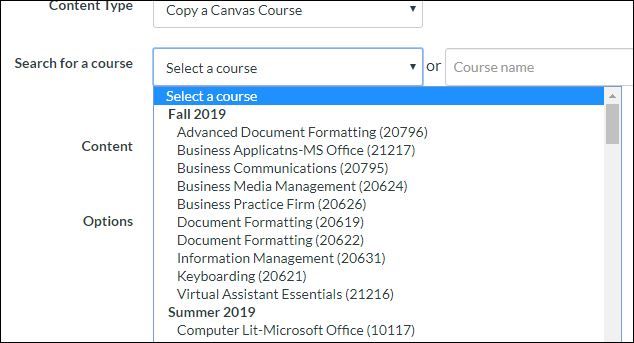
So, when it comes time for instructors to use the Course Import Tool, they see Computer Lit-Microsoft Office (10001) listed under the proper term of the drop-down list where they can choose what course they want to import content from.
I hope this helps, Pam.




This discussion post is outdated and has been archived. Please use the Community question forums and official documentation for the most current and accurate information.