In Canvas Teacher 1.18, the app update allows teachers to enable Dark Mode and tap the Grab Annotation tool to move and delete specific annotations in the mobile app. Additionally, the Canvas App font has been updated to Lato.
Canvas Android app version updates are distributed in a phased rollout, which distributes the update to all users over time. The features in these notes may not immediately be available as an update in the Play Store. The Canvas Teacher Android App requires Android 6.0 or later.
Release Notes Change Log
Back to Table of Contents
Settings
Dark Mode
In Canvas App Settings, teachers can enable Dark Mode.
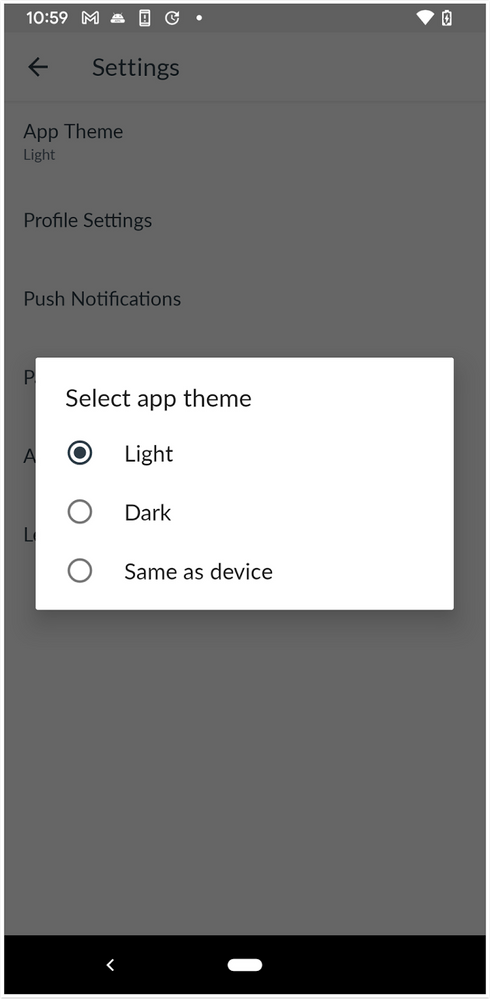 App Theme Selection
In Settings, teachers can choose between three app theme options, Light, Dark, and Same as Device.
Back to Table of Contents
Annotation Toolbar
Grab Annotation Tool
In the Annotation Toolbar, teachers can use the Grab Annotation tool to select and grab point annotations, short text, boxes, or drawing annotations. This update indicates teachers have selected the grab tool to move or delete point annotations, short text, boxes, or drawing annotations from student submissions.
 Grab Annotation Tool
In the Annotation Toolbar, tap the Grab Annotation tool.
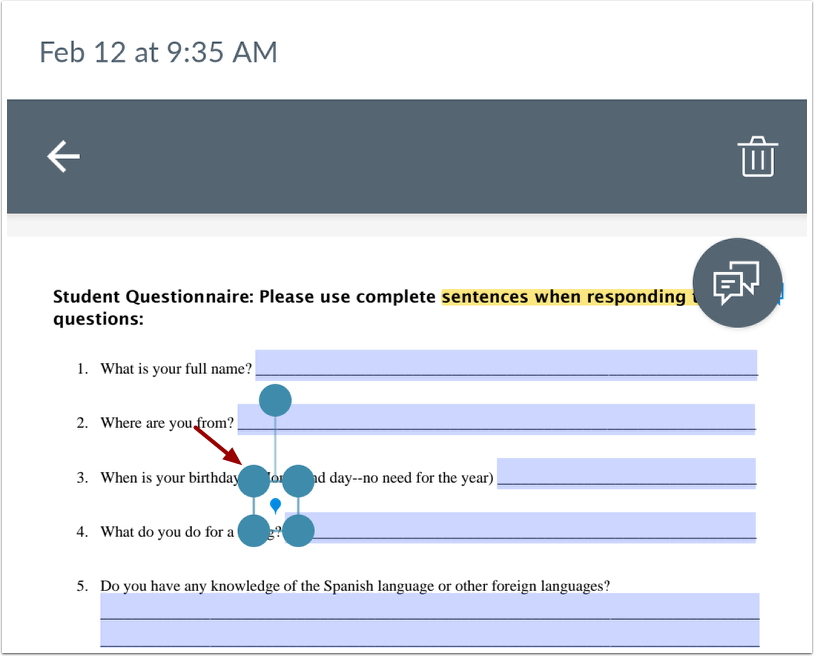 Grab Annotation Selection
To move or delete, tap the point annotations, short text, boxes, or drawing annotations.
Back to Table of Contents
Font
Global Font Update
In the Canvas app, the default font has been updated to Lato. This change improves readability for all font sizes and provides a better visual hierarchy in Canvas Typography.
Release Notes Change Log
BACK TO TABLE OF CONTENTS
| Date |
|
| 2022-06-23 |
Release Notes Published |

