The Instructure Community will enter a read-only state on November 22, 2025 as we prepare to migrate to our new Community platform in early December. Read our blog post for more info about this change.
Found this content helpful? Log in or sign up to leave a like!
Looking to discuss this feature from the 2022-05-21 Release Notes? Post a reply and start a conversation!
ADD FEEDBACK FOR THIS FEATURE IN Q&A TOPIC
- This topic is for feature discussion only—Please share use cases, best practices, questions, clarifications, etc. regarding this feature.
- Please thread replies as possible to keep posts organized. This will help everyone to track discussions and to participate.
ADDITIONAL FEEDBACK—WHERE TO POST IDEA SUGGESTIONS AND SUBMIT BUG REPORTS
- Idea requests for the Product Team to consider should be submitted in ideas.canvaslms.com This is the best way to ask for additional or alternative functionality than what is included in the release. Linking to the related idea here so others can find it is encouraged!
- Bug reports should be submitted to Canvas Support. This way, cases can be connected and uniform updates can be provided to those involved.Bugs will not be triaged in this thread
Excellent! So glad this feature won't be lost next school year for parents whose children will move from Canvas for Elementary to Classic Canvas when they transfer to High school. Also excellent news for our high school case managers.
How will the "View Grades" button on the right side of the dashboard work? If you are filtered on student A, will clicking View Grades scope to the course list/grades for that student? Grades are probably the primary item observers are looking at in Canvas and scoping that page to a single student would be helpful. I'd love to see the student filter on the grades page so parents and case managers can stay on that page and easily view grades for one child at a time.
The release notes show it was delayed. Any ETA on a future release?
Hello @audra_agnelly ,
Thank you for your question. The View Grades button on the dashboard shows a list of all students the observer is linked to. From there, the students' names are clickable which leads to the student grades page. This page does have a drop-down menu where the observer can filter between student grades. I hope this answers your question.
Hello, @brian_mullins Thank you for your question. This feature is currently still available in Beta but we don't have an ETA at this time for when it will be pushed back into production.
"This page does have a drop-down menu where the observer can filter between student grades. "
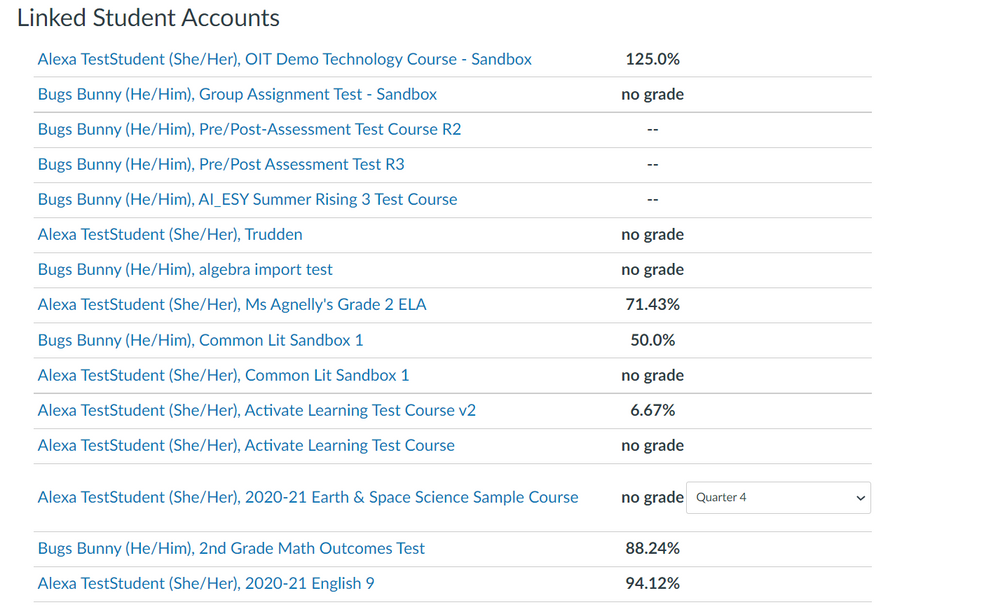
@HeatherAhern if you are an observer and navigated to instructure.com/grades, there is no filter to view grades by student. You see a list of student courses but they are not sorted by student name. Below is just for 2 students, my coworker has 4 children and we have special education case managers who might be linked to a dozen or more student. That screen is impossible to navigate if you have multiple children and this page does not have a drop-down for parents to sort their students, it doesn't even group the course list by student. If you are a parent in the "classic canvas" interface, there is no other way to get an overall view of all your child's grade. In the C4E interface, parents can select the grades tab and they only see the list of courses and grades for the student that they have selected from the drop-down. We need that extra filtering for parents using Classic Canvas.
Hi @audra_agnelly Thank you for clarifying, I apologize I misunderstood. I reached out to one of our teams and wanted to share with one of our product managers @AllisonHowell so they are aware of your request.
@audra_agnelly Thank you for sharing your feedback. I've asked our team to investigate what it will take to make this a better experience for our observers and we'll prioritize accordingly. I'm glad you've taken the time to look at this and hope you'll continue to share your observations and feedback!
Community helpTo interact with Panda Bot, our automated chatbot, you need to sign up or log in:
Sign inTo interact with Panda Bot, our automated chatbot, you need to sign up or log in:
Sign in