In this Canvas release (16 March), admins can search and sort Account Developer Keys. Within the Gradebook, instructors have the option to select multiple filter choices for each filter type. SpeedGrader's media recorder includes screen capture and automatic captioning. Additionally, an update is made to the Quiz and Item Analysis Report for Fill in the Blank question types.
All Resources | Features in this release may be included in product blogs and other content areas. For all related links, view the 2024-03-16 Community tag.
Table of Contents
New Features
Back to Table of Contents
Developer Keys
Search and Sorting
Admin
|
Beta Environment Availability
|
2024-02-19
|
|
Production Environment Availability
|
2024-03-16
|
|
Location to Enable Feature
|
None
|
|
Name of LTI Tool
|
None
|
|
Permissions
|
Developer Keys-Manage
|
|
Related APIs
|
None
|
|
Affects User Interface
|
Yes
|
|
Affected Areas
|
Developer Keys
|
|
Related Ideas
|
[Admin Tools] Sorting Developer Keys
|
Summary
On the Developer Keys page, admins can search and sort Account Developer Keys and Inherited Developer Keys in an account.
Change Benefit
This feature enhances the ease and efficiency of managing the Developer Keys page.
Feature Workflow
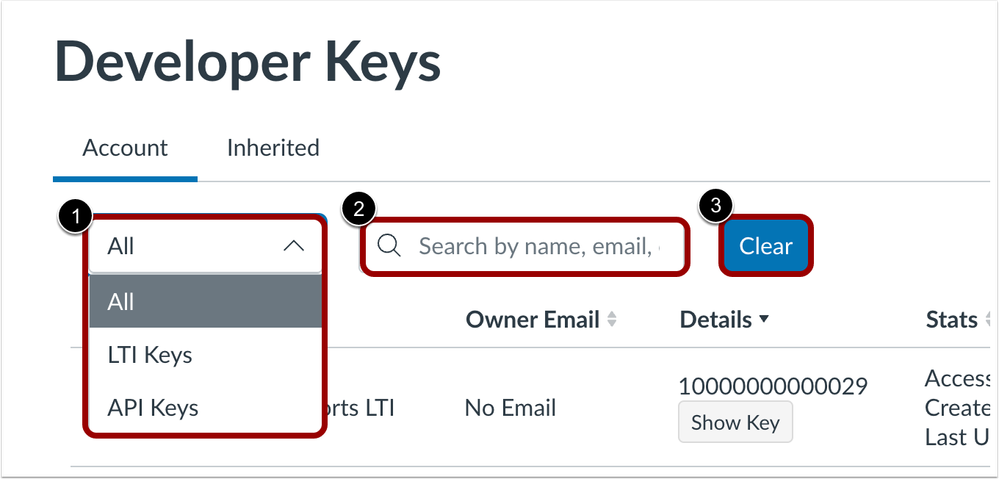 Developer Keys Filter Drop Down Menu, Search Field and Clear Button
Admins can filter by key type [1], search by specific details [2], and clear the search results [3].
Note: For institutions that have more than 10 developer keys, click the Show All Keys button before searching to search all developer keys.
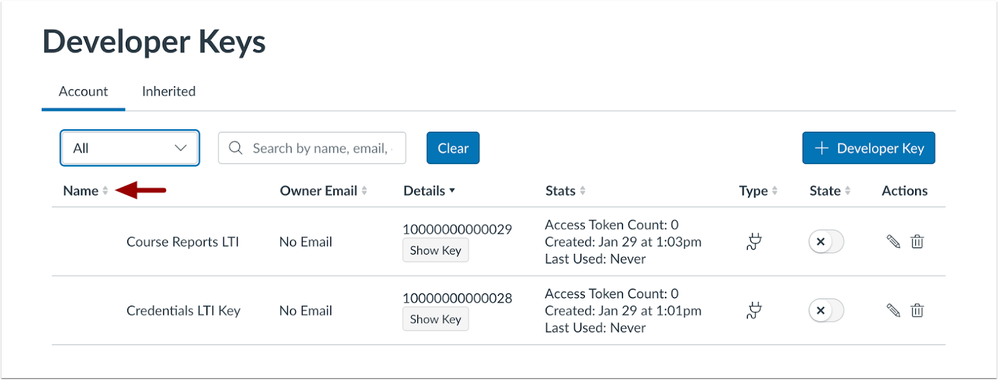 Column Ascending and Descending Icons
Additionally, each column can be sorted in ascending or descending order using the arrow icon.
Feature Video
Embed Code
<iframe width="560px" height="320px" allowfullscreen="true" allow="autoplay *" title="Release Screencast: 2024-03-16 Developer Keys Search and Sorting" src="https://community.instructuremedia.com/embed/df15c51a-af8c-4c95-9dae-474ac10d6645" frameborder="0"></iframe>
Updated Features
Back to Table of Contents
Gradebook
Multi-Select Gradebook Filters
Instructor
|
Beta Environment Availability
|
2024-02-21
|
|
Production Environment Availability
|
2024-03-16
|
|
Location to Enable Feature
|
None
|
|
Name of LTI Tool
|
None
|
|
Permissions
|
Inherent to User
|
|
Related APIs
|
None
|
|
Affects User Interface
|
Yes
|
|
Affected Areas
|
Gradebook
|
|
Related Ideas
|
[Gradebook] Filters - Multi Selecting Sections
|
Summary
In the Gradebook, instructors can choose multiple filter options for each filter type.
Change Benefit
This update improves the user experience by streamlining the process of managing filter selections, offering increased customization options, and facilitating faster filter navigation.
Feature Workflow
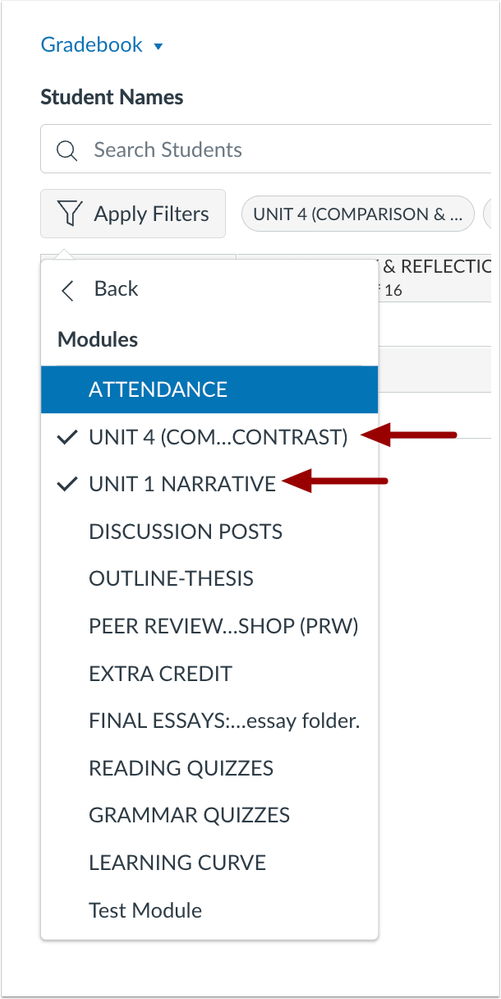 Gradebook Multi Select Filters
Instructors can select multiple filter options when viewing the Gradebook.
Additional Details
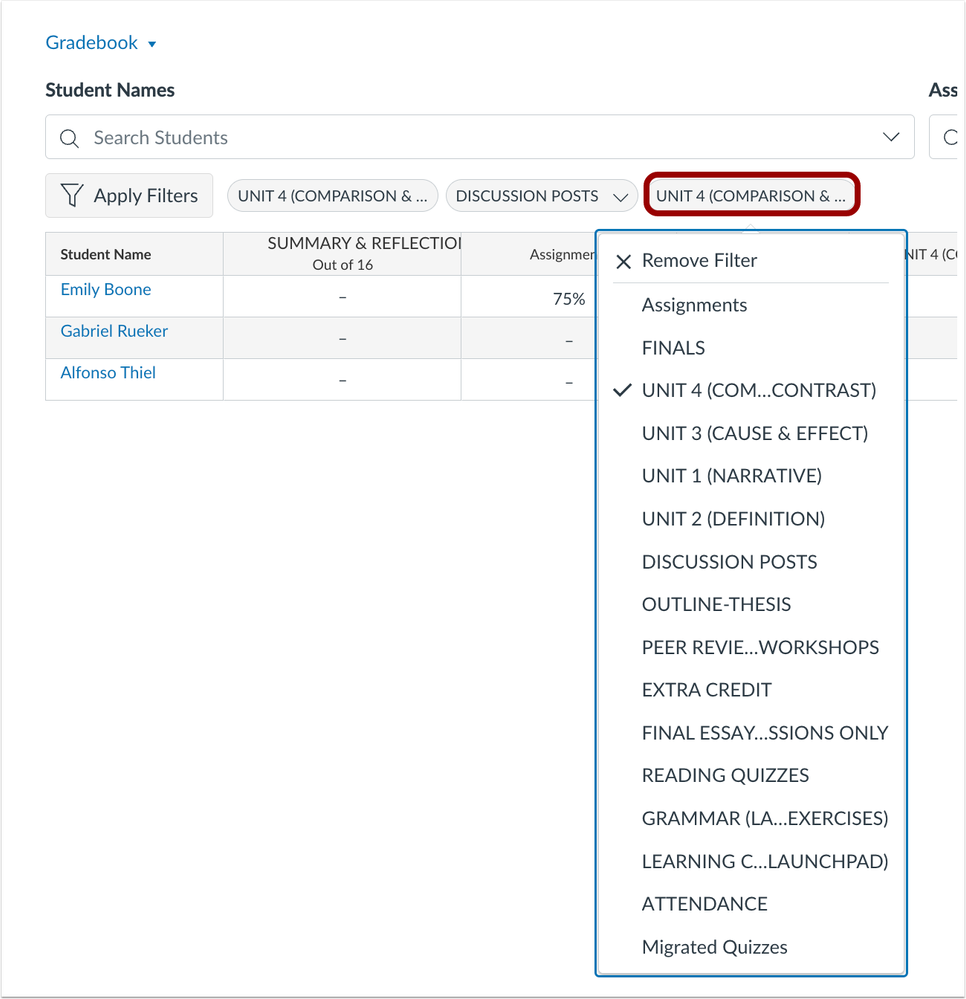 Multi Select Drop Down Menu from Filter Pill
Additionally, Instructors can manage selections directly from the pill in the Gradebook.
Feature Video
Embed Code
<iframe width="560px" height="320px" allowfullscreen="true" allow="autoplay *" title="Release Screencast: 2024-03-16 Gradebook Multi Select Filters" src="https://community.instructuremedia.com/embed/7a0fecdb-972d-4b95-94e1-e54539e94ab5" frameborder="0"></iframe>
SpeedGrader
Media Comment Screen Capture and Auto Captioning [Delayed as of 2024-02-27]
Instructor
|
Beta Environment Availability
|
2024-02-21
|
|
Production Environment Availability
|
2024-03-16
|
|
Location to Enable Feature
|
None
|
|
Name of LTI Tool
|
None
|
|
Permissions
|
Name of Permission relevant to feature area
|
|
Related APIs
|
None
|
|
Affects User Interface
|
Yes
|
|
Affected Areas
|
SpeedGrader Media Comments
|
|
Related Ideas
|
[SpeedGrader] Screen Capture with Audio as a Comment Option
|
Summary
In SpeedGrader, the media recorder includes screen capture and captioning.
Change Benefit
This update enhances the clarity of instructor feedback and improves accessibility by providing a streamlined user experience.
Feature Workflow
Image Coming Soon
When creating a media comment, click the Screen Capture icon to begin recording the display screen. Additionally, captioning is auto-enabled for voice overs.
Additional Details
The screen capture and captioning are available for media comments in SpeedGrader only. Additionally, the recorder is only available in Chrome and Edge. Currently, there are no plans to introduce support for Firefox and Safari in the recorder.
Feature Video
|
Screencast coming soon
Subscribe to this article to be notified of updates
|
Feature Options
Back to Table of Contents
Feature options allow institutions to enable newly developed Canvas functionality according to their preferred time frame. Unless otherwise noted, all feature options are opt-in and do not require any action by a Canvas admin until a feature's enforcement date is announced. For a complete list of feature options, please see Canvas LMS Feature Options.
A feature preview label indicates a feature option in active development, which is being built directly through user feedback. Feature previews deploy updates outside the regular Canvas release schedule and are posted in the Related Releases section in Canvas Releases & Deploys.
Please reference the table below each feature heading for specific feature information. For general information about feature options, please see the Canvas Release Notes FAQ.
New Quizzes
Quiz and Item Analysis Report Fill In the Blank Data
Instructor
|
Feature Option Name to Enable
|
New Quizzes
|
|
Enable Feature Option Location & Default Status
|
Account (Disabled/Unlocked)
|
|
Beta Environment Availability
|
2024-02-19
|
|
Production Environment Availability
|
2024-03-16
|
|
Subaccount Configuration
|
Yes
|
|
Permissions
|
Inherent to user role
|
|
Affects User Interface
|
Yes
|
|
Affected Areas
|
New Quizzes Item Analysis Report
|
|
Mobile App Support
|
Not available
|
|
Free-for-Teacher Availability
|
Not available
|
|
Feature Option State
|
Production-ready
|
|
Related Ideas
|
[New Quizzes] New quizzes Item analysis to include correct, incorrect and not answered stats for all...
|
Summary
The following data is added to the Quiz and Item Analysis report:
- Fill in the Blank- Answer Frequency Summary, Aggregation and supported in the CSV
Change Benefit
This update provides additional information on specific question types for instructors to evaluate student responses and provide appropriate intervention.
Feature Workflow
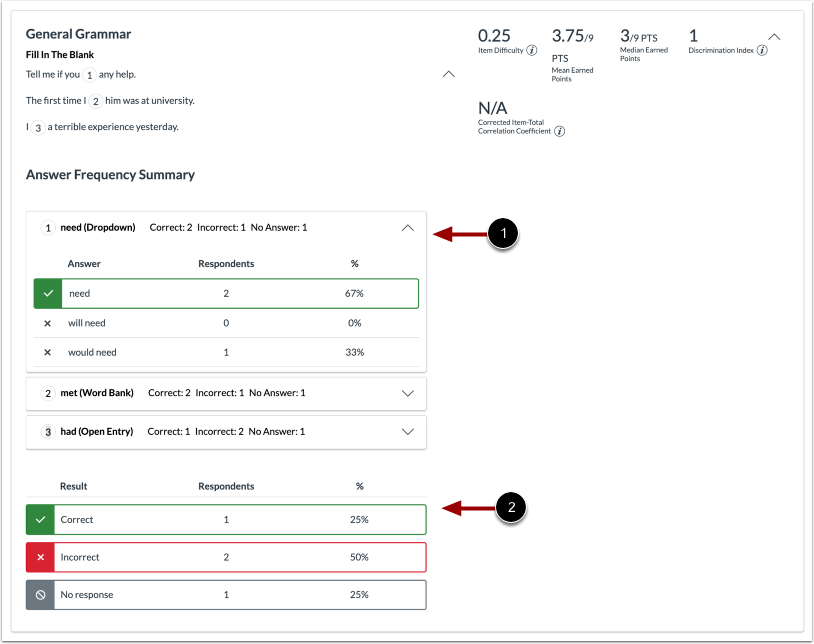 Fill in the Blank Answer Frequency Summary and Aggregation Report
In the Quiz and Item Analysis Report, the Answer Frequency Summary [1] and Aggregation [2] display.
Feature Video

