To say what Brian ( @bbennett2 ) wrote in a slightly different manner ...
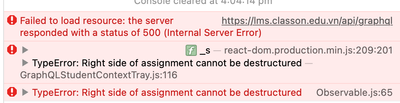
The real problem here is the 500 status code. That means that the server was not able to understand or process the request. It's more likely an error with the way that you are sending the request than the query itself.
For example, I can take generate a 500 internal server error by not wrapping my GraphQL in curly braces.
This will fail with a 500 error (I am using a content-type: application/json header)
"query":"query AssignmentLookup($assignmentId: ID!) { assignment(id: $assignmentId) { course { _id name } } }",
"variables":{"assignmentId":1871620}
But this will succeed
{
"query":"query AssignmentLookup($assignmentId: ID!) { assignment(id: $assignmentId) { course { _id name } } }",
"variables":{"assignmentId":1871620}
}
There are other ways, but it is often a malformed request that generates the error. The server doesn't know how to process it, so it throws the 500 error. Note that if you have errors within the GraphQL itself, then you often get another error.
For example, if I have an extra curly brace within the query, then I get a 200 OK status, but it contains an errors property with a message like "Parse error on ...".
The Type Error and the right side cannot be deconstructed message is a side-effect of the 500 error message. The failed GraphQL query doesn't return a JSON response that the code can parse. That's where the cannot deconstruct message comes from.
In an ideal world, you would check to make sure a valid response was received before trying to act upon it. Those of us who don't program professionally often skip that step, assuming that the request will be successful.
If this is your custom JavaScript, then fix the request. As a hint, I use a REST Client (a lot of people like Postman) to test my calls, especially with GraphQL, before I put them into code.
If this is not custom JavaScript, then file a ticket with Canvas.