The Instructure Community will enter a read-only state on November 22, 2025 as we prepare to migrate to our new Community platform in early December.
Read our blog post for more info about this change.
Found this content helpful? Log in or sign up to leave a like!
I have a Free for Teachers Canvas account.
I want to integrate Edulastic into my account as app. On the Settings/Apps they ask for the following information:
Your Canvas Login URL (e.g. someschool.instructure.com):
Your Canvas Client ID:
Developer keys
Your Canvas Developer ID:
Your Canvas Developer Key:
The questions are:
Hi @Chinara_D,
As far as I know, you can install simple LTI 1.1 apps in the Free for Teacher Canvas instance. Currently, anything that is an LTI 1.3 integration or requires a developer key would require a paid/hosted Canvas instance, as those types of integrations require administrative access that is not available in the Free for Teacher instance. I think using LTI 1.3 integrations may be possible at some point in the future, but anything that needs a developer key seems unlikely to work in the Free for teacher instance.
Hope this info helps.
-Chris
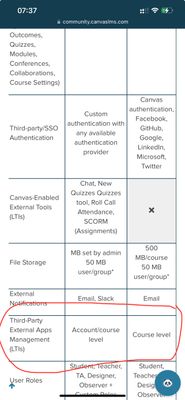
Here they say that Third-Party External Apps Management (LTIs) are available for free accounts but only for Course level, but how to connect it?
Hi @Chinara_D,
Since the vendor asked for a "developer key", that signifies an account-level setup in Canvas, even if you're only using the integration in a single course. That, unfortunately, is not available in the free-for-teacher Canvas instance.
-Chris
Community helpTo interact with Panda Bot, our automated chatbot, you need to sign up or log in:
Sign inTo interact with Panda Bot, our automated chatbot, you need to sign up or log in:
Sign in