Hi @saraberes  Welcome to the Canvas Community. Well, that is certainly odd, because notification preferences in Canvas are not course-specific, but rather all-inclusive for all Canvas courses you are in.
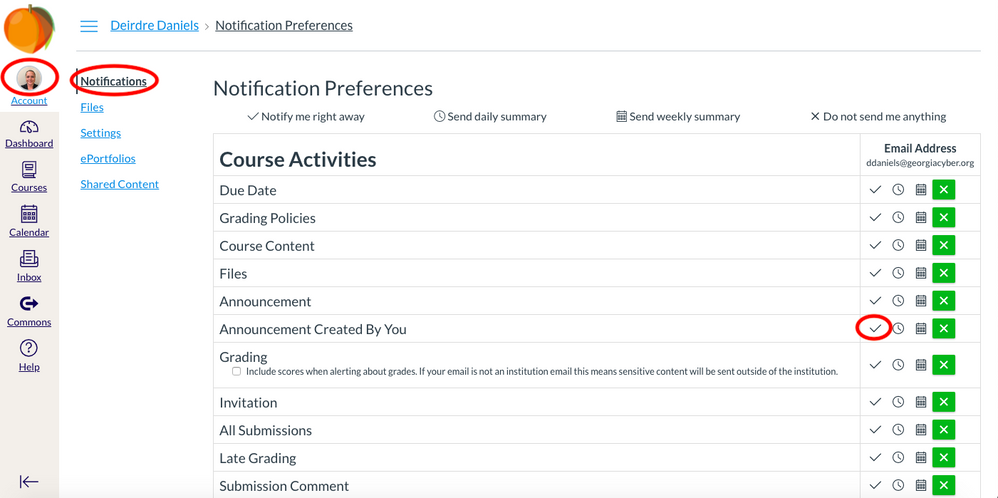
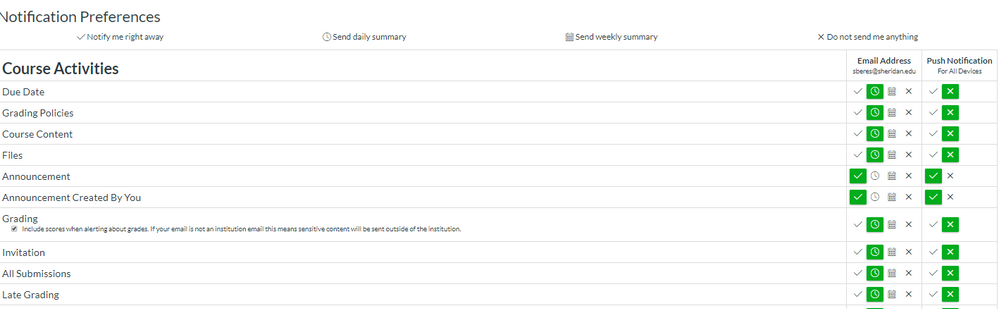
But let's start with your notification preferences, anyway. Head to Account and then Notifications. There is a separate notification preference for "Announcement Created By You." Check to ensure that is set properly so that you should be receiving notifications of announcements. If not, that's the issue.
Next, I noticed your in the Community with a Hotmail address. I personally do not trust third-party email addresses to do a good job of funneling mail correctly, so double-check your spam/junk/clutter folders. Then, see if you can set a filter so that messages do NOT go to Junk in Hotmail. (It's been eons since I've used Hotmail, so I'm afraid you're on your own there, but there's plenty of information via Google searches. If you are using an institutional-associated email address that frankly is better, since I would assume the network administrators are letting messages from Canvas go through. On the other hand, if it's an institutional email that is causing the issue AND your notifications are properly set, it's time to check with your institution.
Finally, try adding another email address to your Canvas profile. (See https://community.canvaslms.com/docs/DOC-13113-4152719736 ) You will now have another column in the Notifications screen where you can set notification preferences for that other email address. Set the proper preferences for "Announcement Created By You" and the next time you create an announcement, see if that new email address gets it. If so, then obviously the issue is with the original address.
Hopefully one of these will work. The bottom line is that especially with an institution that uses Canvas, you should be receiving these messages and if not your institution should work with the Canvas engineers to see why not.
I hope this helps a bit, Sara.







This discussion post is outdated and has been archived. Please use the Community question forums and official documentation for the most current and accurate information.