The Instructure Community will enter a read-only state on November 22, 2025 as we prepare to migrate to our new Community platform in early December. Read our blog post for more info about this change.
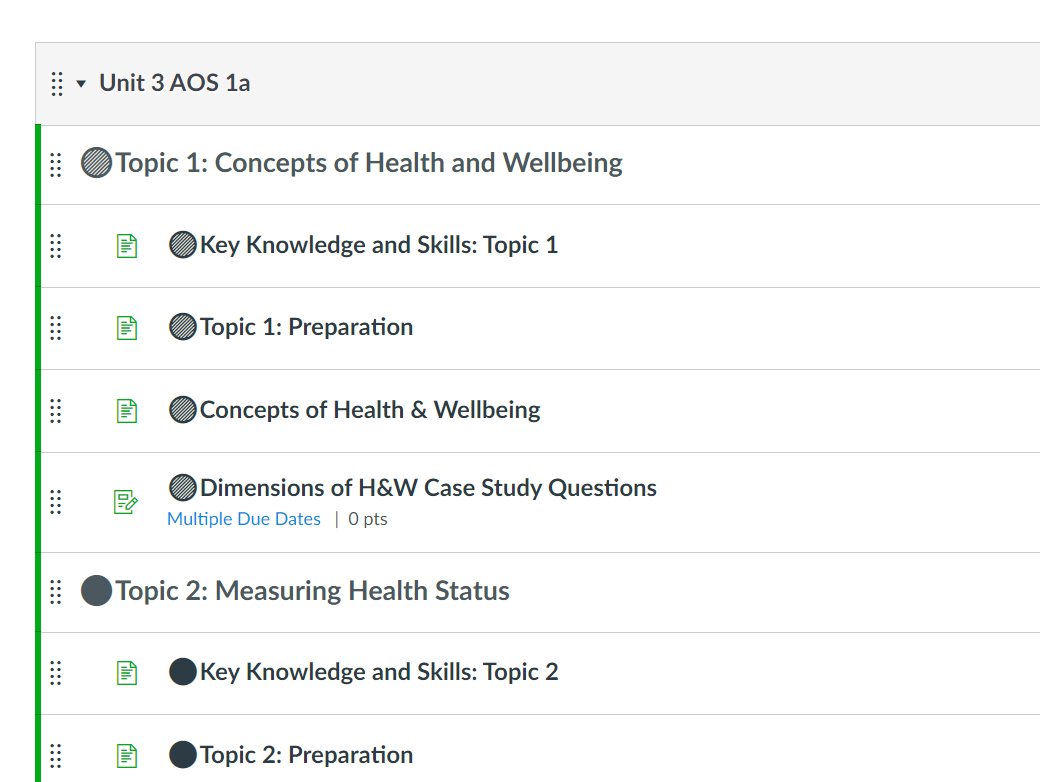
A colleague recently created a number of modules and pages and used colour coded emojis to better distinguish categories. They worked well for a while in Chrome but are now greyed out. She opened the modules in Edge and it worked for a while until again the emjois went grey.
See the attachment. The first topic's circles are green and the second are red.
This has now happened to a number of people. Any ideas brains trust??
Thank you!
Solved! Go to Solution.
It's a system-wide failture. Numerous instructers posting in the FB group "Teachers Using Canvas," including myself, have reported the same problem.
Hopefully, the colors will come back. However, I should point out that using only colors to distinguish between categories is problematic for color-blind students. I would suggest that your colleague also use shapes (e.g. red circle, blue square, green triangle).
It's a system-wide failture. Numerous instructers posting in the FB group "Teachers Using Canvas," including myself, have reported the same problem.
Hopefully, the colors will come back. However, I should point out that using only colors to distinguish between categories is problematic for color-blind students. I would suggest that your colleague also use shapes (e.g. red circle, blue square, green triangle).
Looks like the Chrome folks have identified the issue: https://bugs.chromium.org/p/chromium/issues/detail?id=1266022
Hello Matt, I am having this issue too. I checked the link you posted but it all looks greek to me. Does that mean that Chrome is working on correcting it?
Thanks,
Katie
@kmstewart , that is how I'm reading the comments. The one posted today seems to indicate they know exactly what's happening and why. I confirmed that removing "bold" styles from the CSS does make the colors come back. Hopefully it will get fixed in Chrome 97 if not sooner.
Thank you for the news! I wish we could do something to control it but good to know chrome is at least aware of it.
I did notice that it is working correctly in Firefox.
Community helpTo interact with Panda Bot, our automated chatbot, you need to sign up or log in:
Sign inTo interact with Panda Bot, our automated chatbot, you need to sign up or log in:
Sign in
This discussion post is outdated and has been archived. Please use the Community question forums and official documentation for the most current and accurate information.