The Instructure Community will enter a read-only state on November 22, 2025 as we prepare to migrate to our new Community platform in early December.
Read our blog post for more info about this change.
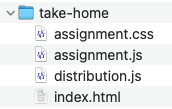
I have a folder that contains all content needed to create a self-standing Web page. The folder contains four files. The index.html is the main file. The two .js files are javascript for functions on the Web page. The remaining file is the style sheet.
Folder
- index.html
- assignment.css
- assignment.js
- functions.js
I had hoped that I could simply drop this folder content into the files for the course, point to the index.html file on an assignment page setup, and have the Webpage show in Canvas as it does when I access it locally on my drive.
Alas, this was not the case. The css and js are not recognized.
My searching leaves me a bit confused on how best to handle what I need. Ideally, the folder content should show as an entire page to itself, not in a frame boxed within the rest of the Canvas window. To work properly, the page should recognize the css and the js files.
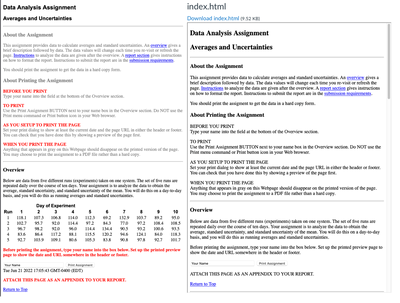
Below left shows what I have designed and want to post. Below right shows what Canvas outputs.
Can someone point to instructions on how to handle what I need.
Solved! Go to Solution.
I have solved this problem. I have posted the folder containing raw html + css + js files on a unix-based Webserver that is provided by our university. I simply point an external link to the folder/file of interest.
My further reading on the community suggests that Canvas will never offer users a way to store raw html with external css and js files within the Files link and serve the raw html simply by creating a link to it.
Consider this topic closed.
Hello there, @jeffrey_weimer ...
Keeping in mind that I am not familiar with the context of the page you are asking about, but from the information you provided and the screenshots you have attached, it looks as though you are trying to post a page of text. Are there reasons why you couldn't just copy/paste that page of text into a content page in your Canvas course and then use the Rich Content Editor tools to do the formatting (such as the Headings, colored text, tables, etc.)? You could even make an anchor link at the bottom (your "Back to top") that would jump to the top of the page to eliminate the need to scroll back to the top. Would you be able to provide some insights or additional details as to why you'd like to use this method over creating a content page in the course? Looking forward to hearing back from you on this. Take care...be well.
Here is a snapshot to show the content in the folder.
Here is a snapshot to show the starting lines in the index.html file.
***
***
This is raw html with external css and js files. Nothing here should choke a standard Webserver.
How do I serve this folder content in Canvas? The ideal case is that what is served appears as a page by itself (without the Canvas framework).
As to why I do not recreate this in Canvas ... simply put ... because it is far easier to code directly what I need.
I think your file should work as you intended, but I believe there's a recent ongoing bug/issue with the way Canvas handles files.
For years I have been using the solution shared by @awilliams in this post
Today I noticed that my files are not working correctly anymore, even those that were working perfectly fine when I uploaded them to Canvas about two weeks ago. The html no longer loads any files in the same folder: Pictures display as broken links, styles defined in a separate stylesheet file are not applied, and any javascript functionality that depends from a .js file in the same folder is gone.
I believe this may be related to the latest canvas update.
Styles and script code added directly in the same html file works correctly. That could be a work around in some cases, but it's not feasible if more extensive scripts, libraries and fonts are needed.
PS: attached is an example. To the left is how an html looks like in my local drive; It used to work exactly the same in Canvas, back when I uploaded it to my course folder about two weeks ago. To the right is the same file, but the way it looks like today in Canvas.
I have solved this problem. I have posted the folder containing raw html + css + js files on a unix-based Webserver that is provided by our university. I simply point an external link to the folder/file of interest.
My further reading on the community suggests that Canvas will never offer users a way to store raw html with external css and js files within the Files link and serve the raw html simply by creating a link to it.
Consider this topic closed.
Hello Jeffrey.
I do what you are asking for frequently. If the web page works locally, it should work from Canvas Files with no changes (including the css and js files). If you want it embedded, then use an iframe, but otherwise a regular link works OK. Here's how I do it.
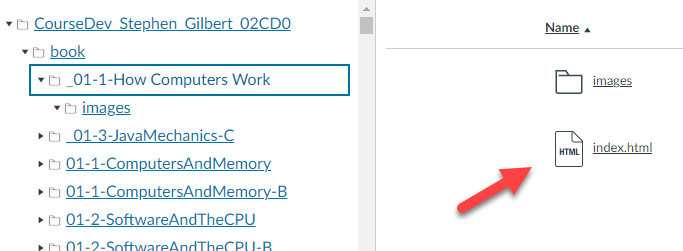
First, I upload the folders with images, html and css. You don't see the css in this picture because I use the same css for all of the pages, so I use a relative URL ../cs170.css. If I click on the link for index.html, it shows me my page, along with all of the css. If that doesn't work, then linking to it will not work.
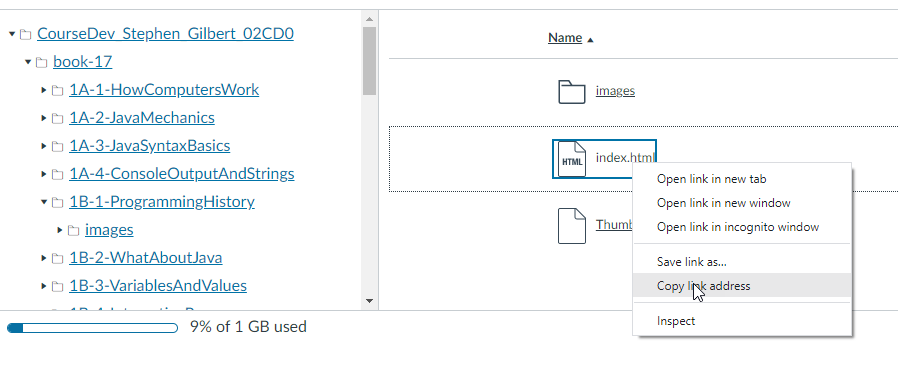
Second I right-click the index.html in Files and save the URL.
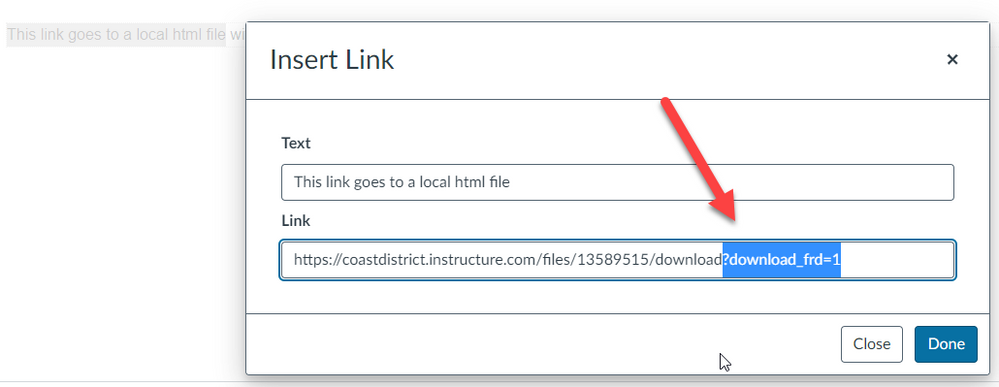
Third, I create an external link and paste the saved URL, removing the query string (the ? and anything following that).
Now, clicking the link will open the page in a new tab with all the CSS displayed. If you want to show it inside Canvas itself, just add an iframe in the Assignment instructions, remembering to remove the query string when you paste in the URL.
@sgilbert wrote ... If I click on the link for index.html, it shows me my page, along with all of the css. If that doesn't work, then linking to it will not work.
Thank you. I follow why this approach should work. Here is however my problem. I am unable to get the equivalent index.html file to display by a direct click on it. I get an error message Access Denied ... Access to this page is limited to authorized users. You do not currently have permission to view this page.
I have disabled the Files link in the main menu listing. I would think as the super user instructor to still have permission to view files in the directory (I can with all other file types).
Could this be a restriction set at the university level?
Yes, if you can't click on it, then it sounds to me like it is some policy that your University has instituted. We have several classes that store HTML in local folders, and I would hear a great outcry if they stopped working, so I know that it works for other instructors at our college. Just as a test, though, I'd try the simplest "hello world" index.html page (no CSS and JavaScript) and see if that worked. If it doesn't, then it's your University's settings. If it does work, I'd start adding css, and then JavaScript to see if there was something that didn't work. For instance, I noticed one instructor who had a problem with certain CSS tags (@Font I believe), since they required a lookup and that lookup was on another server.
The basic "Hello World!" Failed.
<!DOCTYPE html>
<html>
<body>
Hello World!
</body>
</html>Time for me to contact our IT / Canvas admins.
Community helpTo interact with Panda Bot, our automated chatbot, you need to sign up or log in:
Sign inTo interact with Panda Bot, our automated chatbot, you need to sign up or log in:
Sign in
This discussion post is outdated and has been archived. Please use the Community question forums and official documentation for the most current and accurate information.