I understand the need to demonstrate to users that they may need to scroll down to see all buttons on the Global Nav menu, Course Menu, and page. But, as has been noted, a smaller monitor is often plagued by having to scroll to the bottom of the full page before having the option of scrolling to the bottom of the menu. That can be annoying and certainly interrupts navigation flow.
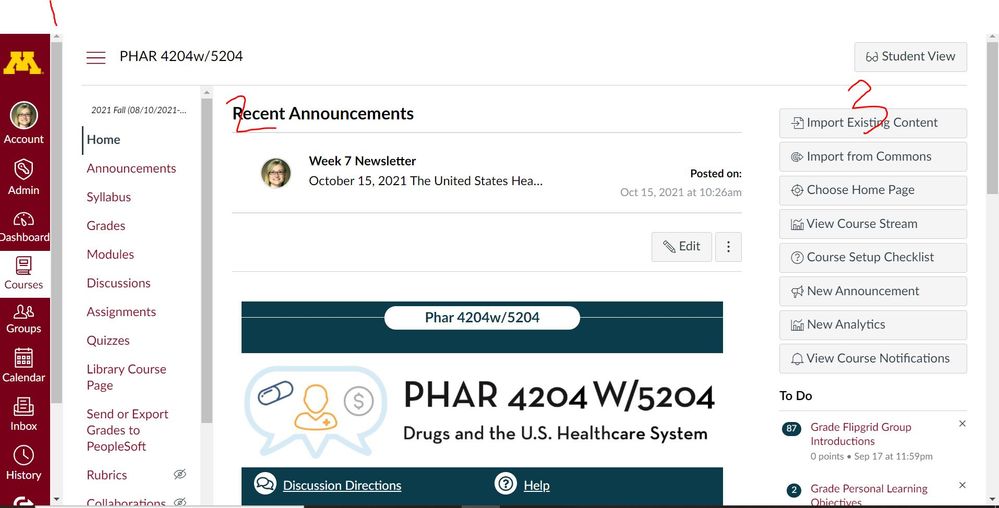
I frequently work on a 15" monitor. If I am at full-screen and 100% zoom, I get all 3 Scrollbars. I have to zoom out to 75% before I get down to just a single bar. As a designer, I often have to zoom in on a screen to get screengrabs and videos as illustrations for helping faculty and students. This means that icons and course menu items are either too small or partially obscured by scrollbars depending on whether I decide to zoom out to get rid of the bars or zoom in to attempt providing clear images of what I'm doing.
Having the ability to manage each menu independently of the content area is a nice idea, Perhaps it would be possible to do that using less obtrusive scrollbars? Maybe have the bars show up only when the user's cursor is hovering over the margins of each display area controlled by a bar?







This discussion post is outdated and has been archived. Please use the Community question forums and official documentation for the most current and accurate information.