Hello there, @faizanali ...
I tested this out in my own sandbox course and created a graded discussion that had a due date of Friday, July 14 at 6 p.m. with availability dates of July 9 at 8 a.m. to July 15 at 12:30 p.m. As you can see from my Calendar view, the discussion topic due date did appear on my Calendar:
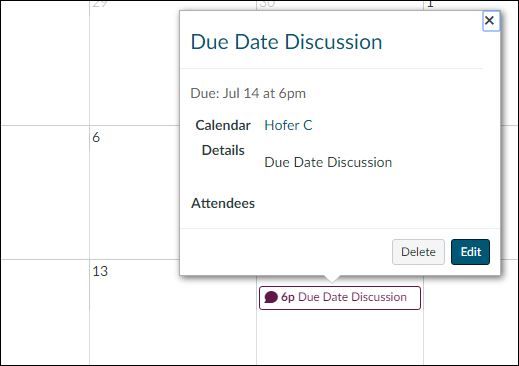
To confirm, are you sure that your discussion topic is set to "Graded"? If "Graded" is not checked and you still use the availability dates that I've used above, then the topic would not show up on your Calendar with a due date. If, however, you do have the "Graded" option selected with a due date specified and it is not showing up for you, it might be best to contact the Help Desk staff by clicking on the "Help" icon on the left side of your Canvas screen.
One other thing I just thought of...in your "Calendar", on the right side of the screen where it lists all your courses that you are currently enrolled in...make sure that the colored square next to your course (where you've set a due date for the discussion) is a solid colored, filled-in square...not a colored outline. This ensures that any dates for the course in question will display on your Calendar.
I hope this helps, Faizan. Looking forward to hearing from you!


This discussion post is outdated and has been archived. Please use the Community question forums and official documentation for the most current and accurate information.