The Instructure Community will enter a read-only state on November 22, 2025 as we prepare to migrate to our new Community platform in early December.
Read our blog post for more info about this change.
Hi
My problem is that all profile pictures uploaded manually by our students have disappeared from their profiles.
Does anyone know where Canvas stores these files or how to recover them?
We have two kinds of uploading profile pictures for Canvas, some are uploaded via a local pictures server, others are uploaded by the students themselves.
Hope you can help as it is about several hundred pictures that have disappeared.
Vh
Flemming - IT service desk
Erhvervsakademi Aarhus.
Solved! Go to Solution.

Here are a couple of things to try.
Depending on when this loss happened, your test or beta instances of Canvas may contain the links to the existing avatar, including the URL. You may be able to transfer that information back to the production instance. The test instance is almost a month old at this point, so it may miss out on recent changes but the beta instance is updated every weekend, so it may be gone already. If you can get it from there, I would save it somewhere as it sounds like there was an issue with your system that overwrote old photos.
If a student uploaded a picture, then the picture itself will likely be available in that user's My Files in the profile pictures folder.
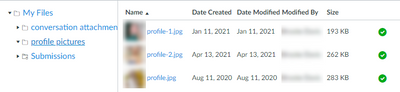
There may be more than 1 image for a student and knowing which one they were using can complicate things. Since a student cannot choose an existing file for their avatar (they have to re-upload it), I would guess that the profile-2.jpg in my example was the most current version.
Another option is to notify students that they would need to reupload their images.
Here are a couple of things to try.
Depending on when this loss happened, your test or beta instances of Canvas may contain the links to the existing avatar, including the URL. You may be able to transfer that information back to the production instance. The test instance is almost a month old at this point, so it may miss out on recent changes but the beta instance is updated every weekend, so it may be gone already. If you can get it from there, I would save it somewhere as it sounds like there was an issue with your system that overwrote old photos.
If a student uploaded a picture, then the picture itself will likely be available in that user's My Files in the profile pictures folder.
There may be more than 1 image for a student and knowing which one they were using can complicate things. Since a student cannot choose an existing file for their avatar (they have to re-upload it), I would guess that the profile-2.jpg in my example was the most current version.
Another option is to notify students that they would need to reupload their images.
The same thing just happened to my instance of Canvas. Yesterday, profile photos, today most of them are blank.
We have just had about ⅔ of our profile pictures disappear as well. Anyone have any idea what is happening?
We had the same problem and it was something to do with our integration with Jenzabar plus something Canvas is now working on.
Once a few things were changed, profile pictures would be retained. Meanwhile, it looks like Canvas is also working on a solution.
This was our initial fix:
"Thank you for following up with us on this case. With the behavior that we are seeing, any updates made to the user account using the Edit a User API endpoint will remove the profile picture unless the user[avatar][url] parameter is included in the request.
If you have the ability to make changes to the API requests that are being made by Jenzabar to include the user[avatar][url] parameter, I would recommend making that change. You can find the Avatar URL for users when viewing the Show User Details API endpoint.
If you are unable to modify the requests that Jenzabar is making, please know that we are actively looking into this issue. I have attached your case to the engineering tracker for this behavior so you will be provided updates as they become available. "
HI @BenJam1n,
any link to the activity that Canvas is doing?
No links, just ticket replies that indicate the engineers found, tested, and deployed a fix over some time. It has been some time since the issue was fixed and everything is working great.
Community helpTo interact with Panda Bot, our automated chatbot, you need to sign up or log in:
Sign inTo interact with Panda Bot, our automated chatbot, you need to sign up or log in:
Sign in
This discussion post is outdated and has been archived. Please use the Community question forums and official documentation for the most current and accurate information.
