We created a 'Learn How to Use Canvas' space for our students and wanted all students to be able to see it and all staff to be able to see it too (so they knew what advice we were giving to students). In the end rather than faff about with enrolment issues, we set the course up as an Institutional Course. So, in the Course Settings we popped it in the 'Default Term' with no End Date, set Visibility to 'Institution' and checked the 'Include this module in the public module index' check box. Then, to facilitate access, we added it as an option to the customisable 'Help' menu, so students can get to it through the global 'Help' option, as shown in the screen shot below.
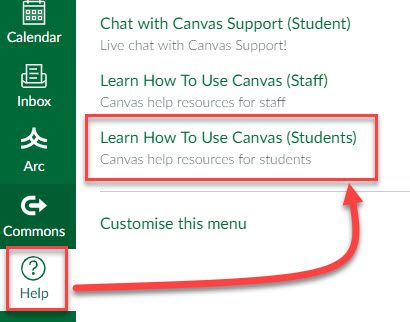
It takes the Roster issues out of the equation for us: If you are a current staff member or a current student you can get access to the course area, if not then you can't (you control these settings when editing the link in the Help menu). We don't have to update users, you're either in or out based on your role.
I appreciate this solution might not work for you. What we have here is essentially a self-help area, mostly pointing to existing Canvas Support materials plus a few in-house guides, so it lends itself to this solution nicely. We don't care less who's 'on' the course as such, but that's okay for us as we're not issuing assignments or anything through it, so there's no need ever to go in the Grade Book etc.










This discussion post is outdated and has been archived. Please use the Community question forums and official documentation for the most current and accurate information.