The Instructure Community will enter a read-only state on November 22, 2025 as we prepare to migrate to our new Community platform in early December. Read our blog post for more info about this change.
I created a question group for randomized quiz questions that should pick 30 questions from test bank questions that I added in the details. There are 174 questions. However, after saving the quiz, this message appeared: "This question group is set to pick more questions than are available." The preview also picked 144 instead of 30 questions. Is there a maximum number of test questions allowed from which the quiz will pick from? If yes, what is the maximum allowed. If none, did I miss anything in my setting up of the quiz?
Thanks in advance to anyone who will help.
Tani
Solved! Go to Solution.
Howdy @taniperalta ,
Thank you for your question. It sounds like you made a question set but didn't link the question bank at the same time as you set up the question set.
How do I create a quiz with a question group to ra... - Canvas Community
After you click on "new question group" then set the name of the group, # of questions (ie 30), # of points... stop before clicking on the "create group" button.
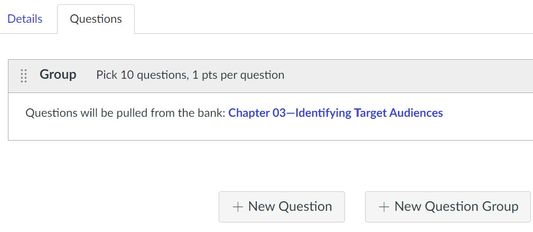
You must click on "link to question bank" to link the question bank before clicking on "create group." When done it should look similar to this.
Hope this helps,
Sky V. King, FIU Online
Howdy @taniperalta ,
Thank you for your question. It sounds like you made a question set but didn't link the question bank at the same time as you set up the question set.
How do I create a quiz with a question group to ra... - Canvas Community
After you click on "new question group" then set the name of the group, # of questions (ie 30), # of points... stop before clicking on the "create group" button.
You must click on "link to question bank" to link the question bank before clicking on "create group." When done it should look similar to this.
Hope this helps,
Sky V. King, FIU Online
Ok, so I went through this last semester where I copied my course with quizzes and exams containing many question banks. I had to edit each to reconnect the question banks to each question in the quiz. Now this semester I have copied the quizzes and question banks only to find that for each the first question bank is linked correctly in each quiz but all the other questions after are not. An error message is displayed (This question group is set to pick more questions than are available) despite the fact that the question banks are present. Worse yet, each bank is duplicated in my new course. What is the best practice for copying quizzes made of question banks? I'm at my wits end. Thanks for any advice and links!
I just read this which is key to my problem: "Note: If you set a question group to randomly select questions from the question bank, the question bank and questions will not be included in quiz exports. A QTI zip file will download the quiz details, but no questions will be included."
Why is this the default setting? Is there any effort to make this more user-friendly for instructors?
Could this be any more confusing and cumbersome? I have yet to figure out to get a question from a question bank into a quiz without getting this error message. I don't want to pull any question from a question bank (as Canvas has dumped everything into one enormous bank) but only a couple questions per group. I have tried adding them to a group. Nope. I have tried adding them as questions (no group) and then dragging them into a group. Nope. Not to mention the browser for the question banks is virtually indecipherable. Ugh.
Community helpTo interact with Panda Bot, our automated chatbot, you need to sign up or log in:
Sign inTo interact with Panda Bot, our automated chatbot, you need to sign up or log in:
Sign in
This discussion post is outdated and has been archived. Please use the Community question forums and official documentation for the most current and accurate information.