@Chris_Hofer I think you've misinterpreted the question.
@aeveslage seems to be talking about the ratings within a criterion, not the order of the criteria.
When I create this rubric:
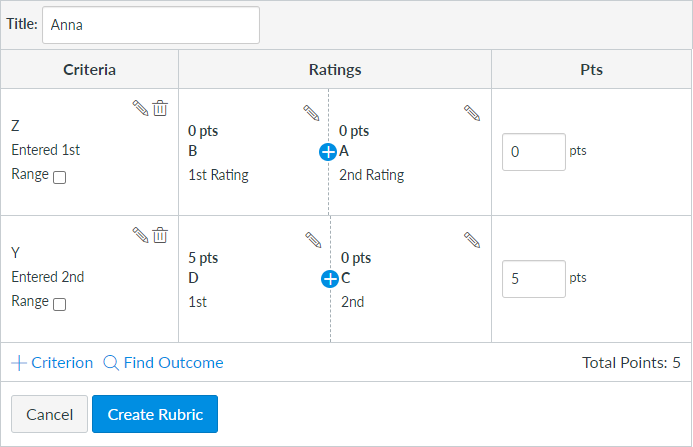
I get this after clicking the Create Rubric:
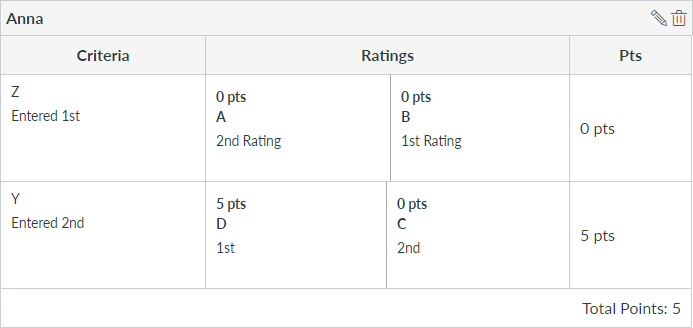
Notice that the criteria Z and Y stayed in the same order, but the ratings A and B switched for the Z criterion because both are worth the same number of points.
Canvas will alphabetize the ratings that are worth the same number of points. The ratings much have unique point values, even if you don't want them to be worth any points. It's not happening because it's 0, it's happening because both are the same value, which just happens to be 0.
Some people resolve to making them worth very little points 0.01 and 0.00 to keep the order they want. Other people reword their choices to make them be in alphabetical order. Still other people preface the words with numbers or letters to get the order desired (A. Exceptionally so, B. Yes, C. Somewhat, D. No).
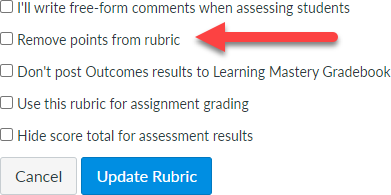
If none of the criteria have point values, then you can make the point values worth whatever you want when you create the rubric and then check the box to remove points from rubric when attaching it to an assignment.
If some of the criteria have points and some should not, then Chris has much more experience with this than I do. I tried to hit some of the major ways, but he regularly creates rubrics while I just keep reusing the same one.





