I have a very strange situation. I seem to have an option in my courses that at least one of the Canvas Admins at my institution does not have. furthermore, three other faculty do not have this option either.
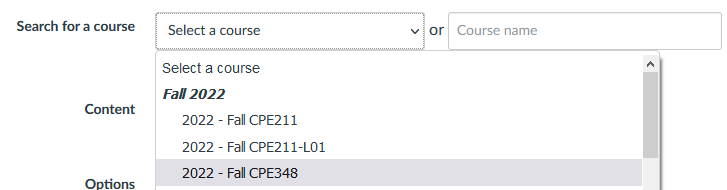
When I go to Import course content and select copy a course, I get two options on my search for a course line(see below)
What everyone else sees is just the box on the right - they do not have the dropdown option on the left that breaks out my courses by semester.
I thought this was an upgrade to canvas until a faculty member asked for help importing a module. They did not have the dropdown. I checked with a few other faculty members and then one of our Canvas Admins. None of them had the drop down.
So, because I use several script and extensions in chrome, I thought it was one of them - but I could not find it. I tried firefox(only one extension which I disabled and no scripts). I still had the drop down show up in my courses on firefox.
I then checked everywhere I could think of to find out what setting I must have tweaked to give me that drop down. I can't find it. It is not a feature option - as that was the first place I checked.
Does anyone else see this functionality? If so, please explain to me what I seem to have done (without remembering) to get this dropdown.
I don't want it to go away, so reporting to Instructure is the last thing that I want to do.
Thanks in advance,
Ron