I thought about giving a mathematical formula with the minimum function, but I didn't want to rely on users knowing what that meant.
What you have doesn't really clear things up and perhaps confuses people based on your wording. The weighted grade is the final grade, not just the numerator. "Unexcused" grade weights is confusing. It's any assignment groups that have graded assignments in them. You don't really excuse assignment groups, you excuse individual assignments within the group. So talking about unexcused grade weights don't make sense. It is much simpler to say "assignment group where the student has at least one scored assignment in it", but then that becomes long and cumbersome and difficult to understand.
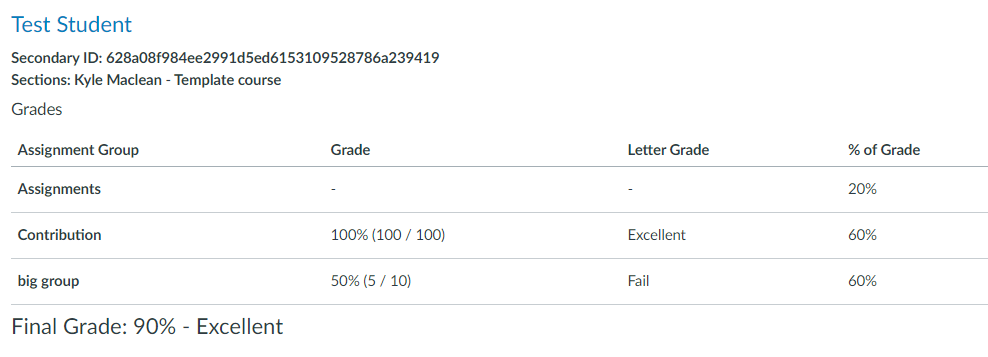
Note that which assignment groups are scored can vary by student. Tommy may have all different assignment groups than Susie does.
Sometimes saying it precisely leads to even more confusion. Here's how Canvas calculates it. But if I try to explain it to people this way, most roll their eyes. It's easier to say it's a weighted average.
(1) For all assignment groups in which a student has at least one scored assignment and (2) provided the sum of the weights of the assignment groups is not 0, then:
Canvas Final Score = [ sum of the assignment group weight times the proportion of possible points for that group ] / [ minimum ( sum of the assignment group weights, 100 ) ]
A minor point: You could use 1 instead of 100 within the minimum, but Canvas treats the weights as percentages (without the % sign), not as proportions. The score within the assignment group is a proportion (points achieved / points possible), so to come up with a number between 0 and 100 (rather than 0 and 1), it treats the weights as percentages rather than proportions.
To see, this, you can add /graphiql to the end of your Canvas dashboard URL to open the graphql explorer.
Paste this code in the box and then change 3903130 to be one of your courses (instead of mine).
query assignmentGroupWeights {
  course(id: "3903130") {
    assignmentGroupsConnection {
      nodes {
        _id
        name
        groupWeight
        state
      }
    }
  }
}
Now click on the execute / play triangle at the top.
You'll get something like this:
{
  "data": {
    "course": {
      "assignmentGroupsConnection": {
        "nodes": [
          {
            "_id": "7479521",
            "name": "Activities",
            "groupWeight": 10,
            "state": "available"
          },
          {
            "_id": "7455212",
            "name": "Assignments",
            "groupWeight": 0,
            "state": "deleted"
          },
          {
            "_id": "7479522",
            "name": "Assignments",
            "groupWeight": 10,
            "state": "available"
          },
          {
            "_id": "7479523",
            "name": "Projects",
            "groupWeight": 35,
            "state": "available"
          },
          {
            "_id": "7479524",
            "name": "Concepts",
            "groupWeight": 45,
            "state": "available"
          },
          {
            "_id": "7479525",
            "name": "Badges",
            "groupWeight": 0,
            "state": "available"
          },
          {
            "_id": "7517168",
            "name": "Imported Assignments",
            "groupWeight": 0,
            "state": "deleted"
          }
        ]
      }
    }
  }
}
You can also verify it by looking at the source code that does the calculation.
Canvas doesn't actually use a minimum function, though. They use some if () statements. If the fullWeight (the sum of all the weights) is 0, your grade is null. This takes care of the division by 0 restriction. If the fullWeight is less than 100, then it adjusts it using the weightedPercent() function. Otherwise, it returns the weighted grade.