The Instructure Community will enter a read-only state on November 22, 2025 as we prepare to migrate to our new Community platform in early December. Read our blog post for more info about this change.
Found this content helpful? Log in or sign up to leave a like!
Hello-
I"m having trouble launching a screen recording on Canvas Studio. I have had luck in the past but am finding that is no longer working. I have also checked my privacy settings and they are all correct. Any help would be appreciated.
Thanks!
Solved! Go to Solution.
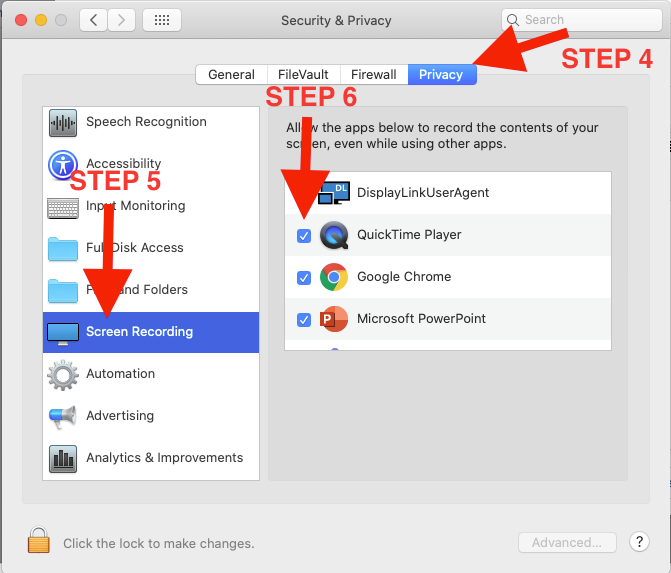
@jkoel1 Apple blocks the access of your browser to record your screen by default. Here are the steps to fix (I use Google Chrome as my browser so the example is for giving Chrome access)
Hope this helps!
-Nick
Hi @jkoel1 ,
@nwilson7 gave some great information. I would just like to add that on step 6, you need to check "screen recording" as well.
In addition to this. If that continues to give you issues. I would advise you to remove all screen recorder apps from your computer and re-install screencast-o-matic from Studio and re-install it.
@jkoel1 Apple blocks the access of your browser to record your screen by default. Here are the steps to fix (I use Google Chrome as my browser so the example is for giving Chrome access)
Hope this helps!
-Nick
Hi @jkoel1 ,
@nwilson7 gave some great information. I would just like to add that on step 6, you need to check "screen recording" as well.
In addition to this. If that continues to give you issues. I would advise you to remove all screen recorder apps from your computer and re-install screencast-o-matic from Studio and re-install it.
I followed the steps and still get asked to download and install screencast-o-matic every time I try and launch screen capture. It's a never-ending cycle.
If you encounter problems with Canvas Studio, you can use this free online screen recording. The same is true, it is also easier to use.
QuickTime Player or Screenshot Toolbar is typically enough for basic Mac screen recording. But for more advanced functions like capturing system audio and microphone simultaneously, live editing, or lag-free recording, you may consider a professional screen-recording tool for Mac like DumpMedia Screen Recorder.
Community helpTo interact with Panda Bot, our automated chatbot, you need to sign up or log in:
Sign inTo interact with Panda Bot, our automated chatbot, you need to sign up or log in:
Sign in