The Instructure Community will enter a read-only state on November 22, 2025 as we prepare to migrate to our new Community platform in early December. Read our blog post for more info about this change.
Found this content helpful? Log in or sign up to leave a like!
The fact that a student has to go back to "Re-submit Assignment" in order to see their submission attempts is very clunky. The student should be able to switch submission attempts from the Submission Details view, where they see comments and feedback on the attempt as well as any annotations, etc. the teacher added to the uploaded document.
Solved! Go to Solution.
@hechla, thank you for this feedback. We completely agree! We are working on an update that will allow the student to go to the same submission details page whether they click on it from a content page (such as assignments or modules) or if they click on the assignment title from the grades page. Once on that page, they will be able to filter for their various attempts to see their submission and feedback on that particular attempt.
Thank you. That's good to hear. This issue has gotten a lot of discussion...
https://community.canvaslms.com/t5/Idea-Conversations/Student-view-View-submissions-and-comments-for...
Yes, it definitely has. I spent a decent amount of time reading through the various comments and will be adding a comment there with a link to the blog post that I am currently finishing to post in this space.
Has this issue gotten resolved yet?
If my students resubmit work (such as a revised essay), can they return to their earlier submission and my annotations via Canvas to retain their learning from that earlier marked assignment?
If so, how? If you can send clear instructions I can relay to my students, I'd be obliged.
Ellie DesPrez
English Department
John Burroughs School
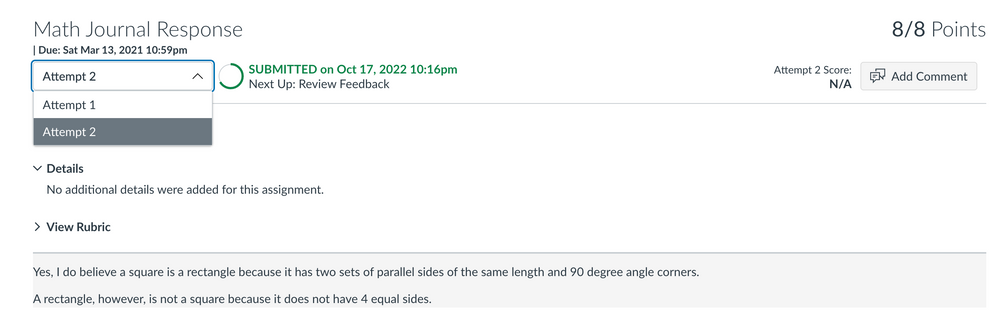
Hi, @edesprez. Yes, this has been resolved for some time. When the Assignment Enhancements - Students feature option is enabled, students are able to view each submission and the feedback that they have received by simply selecting the attempt from the drop-down as shown in the screenshot below.
Student assignment submission drop-down menu
Community helpTo interact with Panda Bot, our automated chatbot, you need to sign up or log in:
Sign inTo interact with Panda Bot, our automated chatbot, you need to sign up or log in:
Sign in