The Instructure Community will enter a read-only state on November 22, 2025 as we prepare to migrate to our new Community platform in early December. Read our blog post for more info about this change.
Found this content helpful? Log in or sign up to leave a like!
As this is a technical issue, I am beginning with some background (for those who might stumble upon this). The actual question is in bold below.
For years, Canvas has allowed, first by invoking MathJax manually by adding the requisite <math> </math> tags, but now by default, users to essentially use LaTeX code in their pages. This is often used to render mathematical equations and other notations.
LaTeX code comes in two versions: inline and display.
Inline LaTeX is processed and displayed inline. So if you want to say, "The derivative of x^2 is 2x", you would use inline LaTeX. This is done in LaTeX itself using $s. So you would have $x^{2}$ to display x^2. Since $s mean something specific in the HTML world, MathJax (which is what allows the LaTeX code to be rendered when included in an HTML document) has users use \( \). So we would instead write \(x^{2}\).
Display LaTeX is processed and displayed on its own line, using a larger font and having a few other typographical modifications. In LaTeX, you use double-dollar-signs: $$LaTeX code$$. In MathJax, you can use either this syntax, OR \[ \]. That is, you can do: \[LaTeX code\] to invoke display mode.
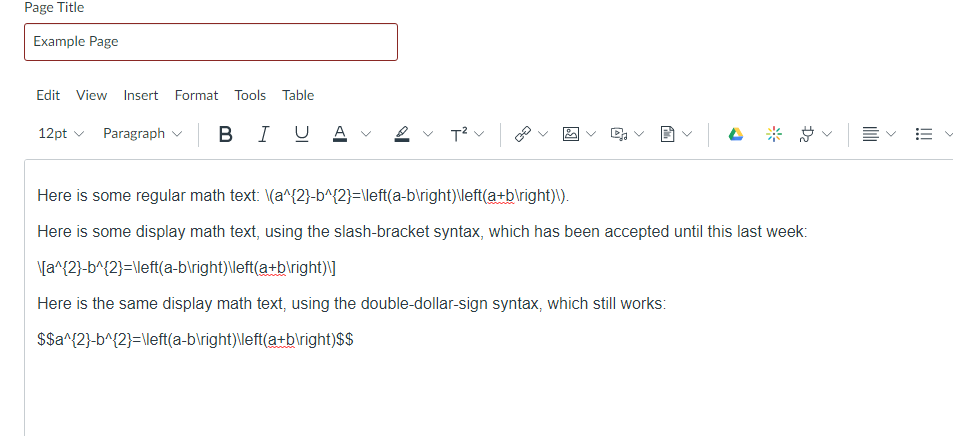
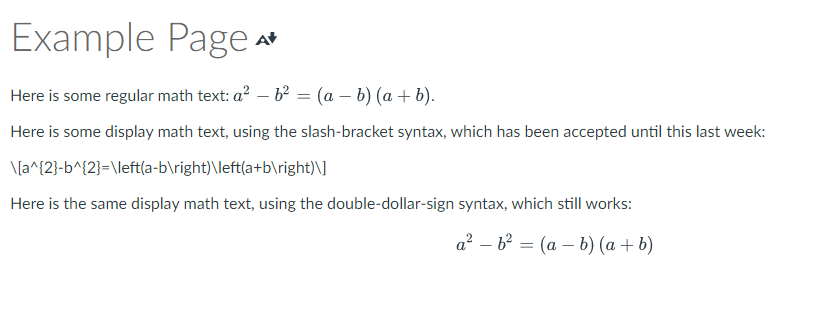
The problem is that the \[ \] method no longer works in Canvas (Indiana University installation) to trigger LaTeX display mode. Is there a reason this was done? The \[ \] character groupings are not read as escape characters to trigger special behavior, so they (and everything inside of them) are treated as just plain text. This problem occurs on various PC/Mac/Android browsers.
Bizarre note: At least as of yesterday, these tags WERE being parsed correctly by the Canvas Teacher app. (Perhaps it has its own methods for rendering, and it has not been updated yet.)
Moving forward, and at least for right now, I can make pages using the $$ syntax. However, it would not be practical to go back and change hundreds of pages to use this, and so this breaks (at least part of) the mathematical content of many course pages, not just for me, but for many of my colleagues as well. Assuming this was unintended, I must implore that it be reversed as soon as possible.
(My colleagues and I have contacted our school's teaching technology department, who is our liaison with Canvas. They have sent this to Canvas, but the initial response seemed to indicate that they might not have understood what the exact issue was.)
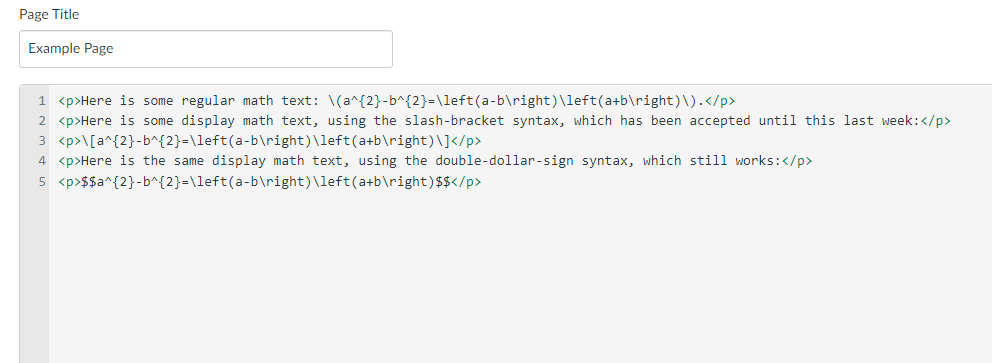
To show this in action, I made a minimal example. What follows is a sequence of three images of this page. The first is the page as it renders in a browser. The second is the edit window. The third is the HTML editor.
Solved! Go to Solution.
Hi all, the change has been reverted. Please let me know if you continue to experience any issues, but all should be working as it was previously.

Same issue. Started 21-Mar-2023.
I have the same issue, and it was brought to my attention yesterday (21 March 2023).
Follow-up. Reported issue to Canvas. Our IT contact was told by Canvas L1 support to contact MathJax...loving the customer service.
So, tested MathJax \[...\] delimiters in simple HTML file outside of Canvas using CDN and all worked as expected. This seems to be a Canvas issue - did they redefine the default MathJax math delimiters locally? Accidentally or intentionally?
Note that the MathJax Documentation - Math Delimiters states:
"By default, the TeX processor uses the LaTeX math delimiters, which are \(...\) for in-line math, and \[...\] for displayed equations. It also recognizes the TeX delimiters $$...$$ for displayed equations, but it does not define $...$ as in-line math delimiters." (...more in linked document)
Correct. MathJax works properly in HTML environments within \( \) for inline and \[ \] or $$ $$ for display. This issue is happening only within Canvas for me.
Regarding customer support, it has been a positive experience for me so far: I have heard back that yesterday Instructure has found the root cause of this, and they are internally working on a solution.
Thank you for sharing your update on the issue. We have received no recent updates on the status of the issue that was submitted.
I hope the resolution is timely since it is having an impact on students completing math online assignments (in Canvas Quizzes) which use display formatted LaTex in many questions. The students found a workaround to copy and paste the LaTex into Desmos (a tool they already use)...which formats if properly in most instances that occur in their questions. Not a great workaround beyond a few days or a week.
@thorine Thank you for writing this up and for alerting your CSM about this issue.
Last month, we had bug reports of users noting that non-math content was being errantly processed and typeset by MathJax on pages in Canvas. In our efforts to curtail this, we made configuration changes to the delimiters that MathJax looks for when identifying math on Canvas pages. This was an unintended side effect of that change and we are working quickly to restore this functionality.
I will update this thread when we have reverted the change. Thank you for your patience!
Hi all, the change has been reverted. Please let me know if you continue to experience any issues, but all should be working as it was previously.
It is still (April 18, 2023) displaying incorrectly for me. Canvas does not recognize the /[ ... /] delimiters for any of my equations. I am having to go back and change to the $$ ... $$ delimiters for hundreds of problems. For the life of me, I can't understand why Canvas changed it in the first place. Something about if it ain't broke ....
Some follow-up I have discovered today (April 18,2023). The \[ ... \] delimiters display properly in an announcement. And, while I don't have any evidence, probably in a page as well. My problem is in (new) quizzes. The \[ ... \] does not display correctly - just as text. The $$ ... $$ method displays correctly in problems.
Also, even though I didn't state it before, the \( ... \) delimiters work correctly in in-line display.
TH
Community helpTo interact with Panda Bot, our automated chatbot, you need to sign up or log in:
Sign inTo interact with Panda Bot, our automated chatbot, you need to sign up or log in:
Sign in