Hello @NMarinus (and @SusanNiemeyer and @chriscas) ...
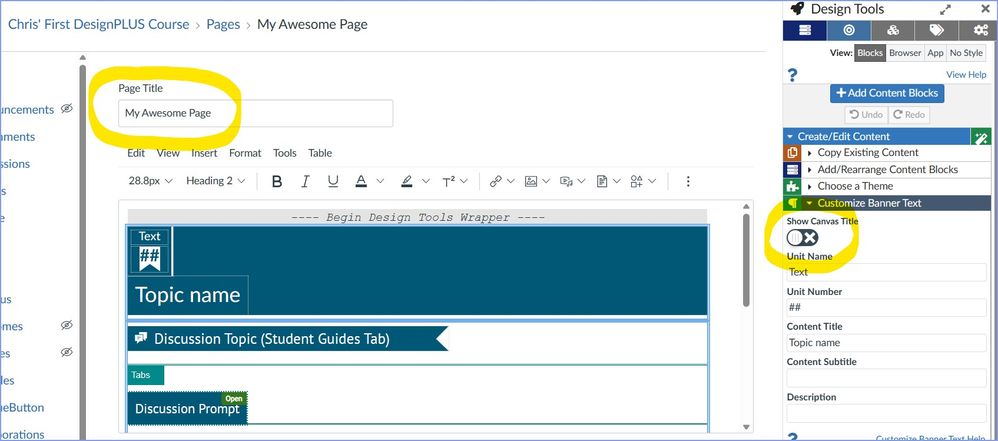
I'm not sure if your schools have purchased the Design Tools software from Cidi Labs, but if you have this integration available to you, removing the page titles is possible. Here are a couple screen shots for you. As you can see from my screenshot, my page name is "My Awesome Page". Then, in the Design Tools toolset on the right, under the heading "Create/Edit Content" >> "Customize Banner Text", there is a toggle switch to "Show Canvas Title". If this is turned off, then "My Awesome Page" will not show at the top of the page once I save my edits. Titles can be removed on an individual page basis. So, if you want page titles on some of your course pages and not on others, this is entirely possible.
Here is what the page looks like without the "My Awesome Page" title displaying on the screen:
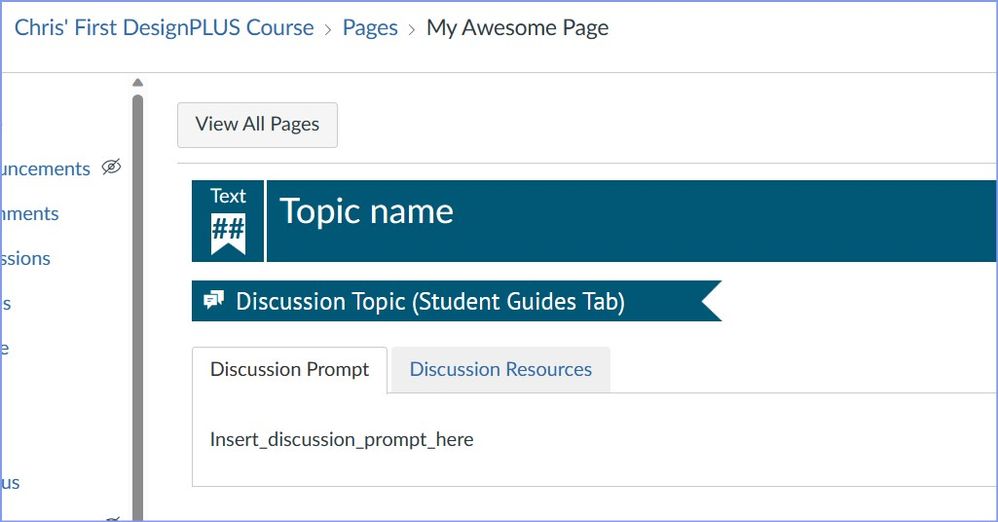
Note: I could remove all of that blue banner stuff as well...that was just some stuff I had added to my page as I was playing around with page designs a while back.
There's so much more to Design Tools...way too much to cover here...but I thought I'd share this slick part of Design Tools that allows you to do this without messing with any code. I hope this helps in some way.


