The Instructure Community will enter a read-only state on November 22, 2025 as we prepare to migrate to our new Community platform in early December. Read our blog post for more info about this change.
Found this content helpful? Log in or sign up to leave a like!
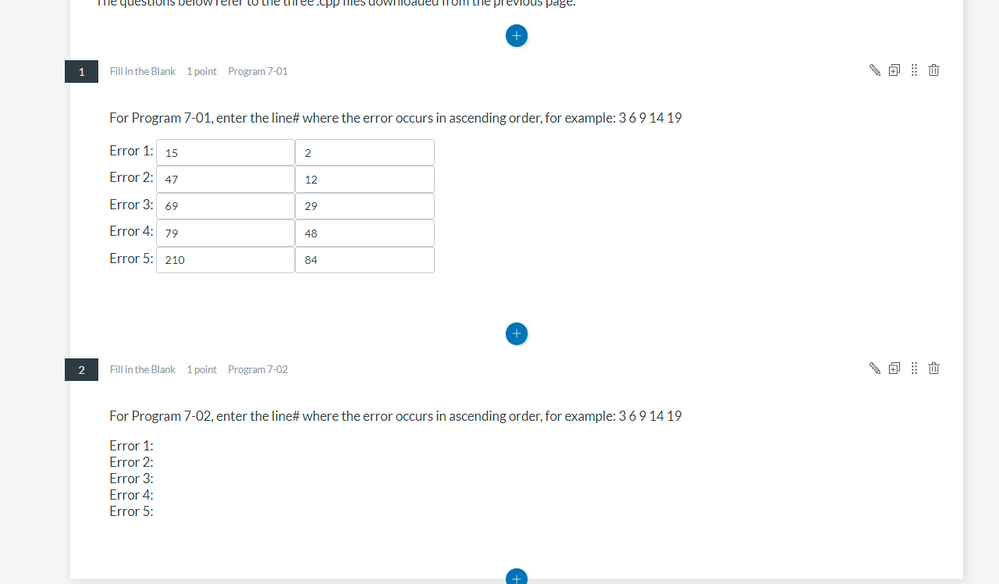
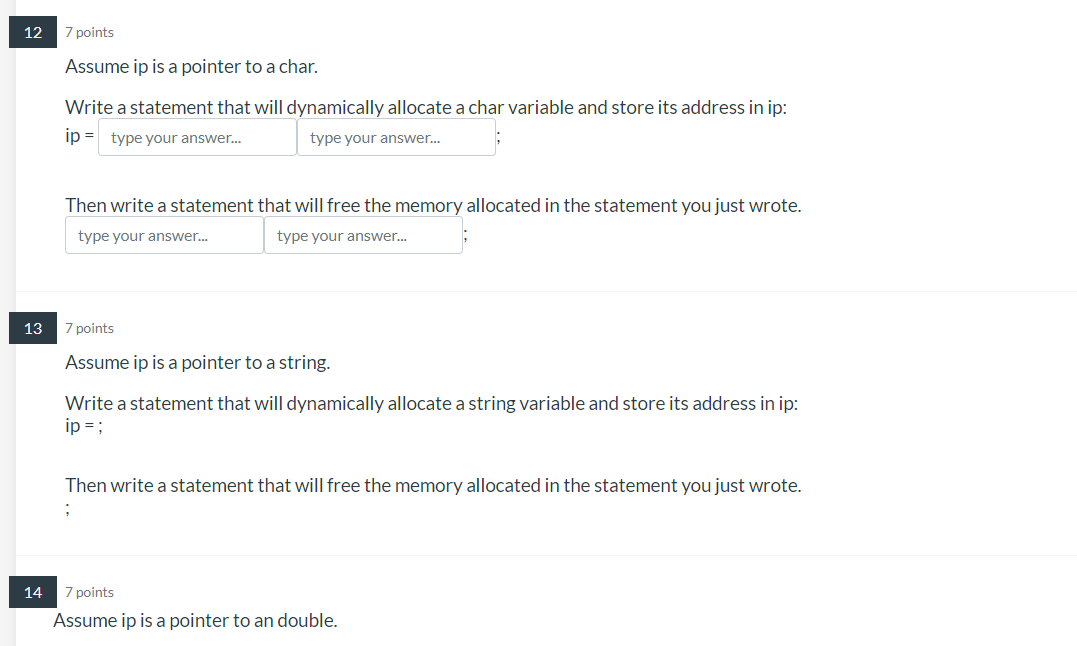
The backticks to mark a blank in a question doesn't work for multiple characters, like asterisks or brackets. I'm working on fill-in-the-blank questions for a computer programming course and the inability to use those characters make fill-in-the-blank on New Quizzes unusable.
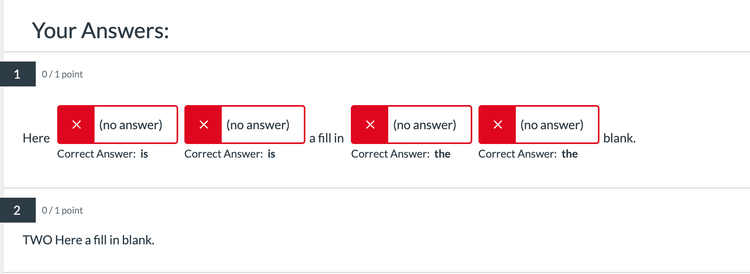
I've tried workarounds and get errors. There are multiple blanks for one answer. And in some cases, the blanks don't appear at all, so there's nowhere for someone to enter an answer.
Hello @MalenaM
We might need some more information or screenshots of what you are seeing here with your Fill In The Blank type questions.
With Fill in the blanks questions, the answer just needs to be surrounded by backticks( ` ) to indicate where the student will fill in the answer. E.g. "Roses are `red`, violets are `blue`" in which the words Red and Blue will be the fill in the blank answers.
Do you happen to have some examples of the answers you are surrounding with the backticks that you can provide us with? We can try to test them out and see if there are any possible solutions.
HERE is the Canvas guide on setting up Fill in The Blank questions on New Quizzes.
-Colton
We filed a ticket on this and were told it is a known issue. It renders F-I-B questions (and hence New Quizzes) useless in many applications. Hopefully it will be fixed soon.
Thank you. Here are some answers that I couldn't use fill-in-the-blank questions for:
When I'm converting these from Classic Quizzes, the backticks are filled with the words `response1` instead of the original answer. (I'm not sticking to Classic Quizzes, because the quiz is pulling from other item banks which are already formatted as New Quizzes.) Also, were you able to see the screenshot in the original post?
This is another issue I'm facing. I duplicated a question and updated the answers. When I close that question, the two sets of fill in the blank answers appear on the original question and no answers appear on the duplicated question I just finished uploading. When I edit the first question with two sets of answers, they don't appear in the edit mode, so I can't get rid of them.
The second question shows the answers in edit mode but not when viewing the question outside of edit mode.
New Quiz fill in the blank question errors
@ColtonSwapp Is there any update on this issue? I just tried showing someone how to quickly copy a fitb question for making the next question, but we too are having this problem.
Serious errors now that it is no longer just a highlight. Thing 1: I can't use an International Keyboard when typing French quizzes and fill-ins as the back tick is also an accent mark so I have toggle between the 2 and it TAKES SO LONG! Thing 2: It is randomly adding boxes that were not back ticked and trust me the back tick was such an issue that I kept having to dump a question and start again. Even so, what I saw looked fine but translated as doubled boxes. And sometimes boxes not even in the question.
Upshot-please for the love of the the time suck it has become, go back to the highlight version of fill-ins because as is, it has become a 100% useless tool for a language class. It is bad enough that lock down took accent capability away. No the back tick is causing issues. New Quizzes will be useless for typing for a world language class.
Unless the answer involves only alphanumeric characters, you won't be able to use Fill in the Blank (FIB) questions. If the following were to be the answer, H<sub>2</sub>O, the question fails to save/update. I hope that the Canvas programers are able to resolve this issue.
Would love to see an update from the Canvas team on this one.
Me too.
Community helpTo interact with Panda Bot, our automated chatbot, you need to sign up or log in:
Sign inTo interact with Panda Bot, our automated chatbot, you need to sign up or log in:
Sign in