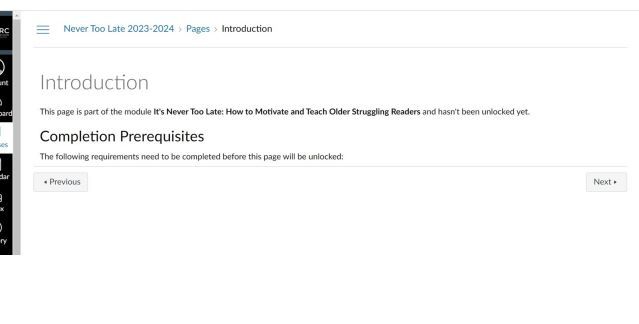
I just had a case today where this happened. As a Canvas Admin at our school, I could see in View Progress that the student had met the requirements to be able to view the page. But when I 'acted as' the student, I could see the message about Completion Prerequisites not being met. After the instructor removed the Module requirements, I 'acted as' the student again and was able to load the page just fine.
I went ahead and did some additional investigation in the Beta instance of Canvas, after completely wiping, updating, and re-launching my browser. I still experienced the issue when 'acting as' the student, so I am confident it was not a student device issue.
I have seen this happen before in a different course, and was told by Canvas Support that it was likely "an issue with course and/or module caching which we see sometimes" ... "and is fixed by our team clearing the cache on the back-end. One thing that can be done, would be to avoid making changes to the modules once students start progressing through them."
In the current case the instructor had made changes to the module once students had started progressing through it. However, the issue only seemed to affect one student. I have not been able to figure out any common thread in terms of what triggers the course and/or module cache to freeze on the Canvas side. We did find that we can usually un-stick the cache on the Canvas side by opening a Canvas item in edit view and then re-saving it with no changes.
I do wish I had a sense of how often students may be affected by cache issues on the Canvas side. I would hate to be telling students to clear their caches when in reality it is the cache on the Canvas side that needs attention. If anyone has some best practices for troubleshooting these types of issues, please share.