The Instructure Community will enter a read-only state on November 22, 2025 as we prepare to migrate to our new Community platform in early December. Read our blog post for more info about this change.
Found this content helpful? Log in or sign up to leave a like!
While this seems to be a minor 'issue', I am surprised it is occurring.
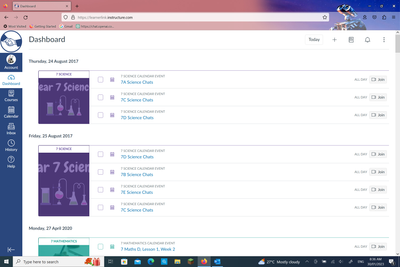
In the Dashboard List view, one can scroll up and see content from expired courses. I would say that this is not helpful and can be quite confusing for students.
Is there a way to prevent content from completed courses appearing in the Dashboard list view?
I see exactly what you are seeing. To make matters worse, there are boxes next to the lines you show that you can click on to select, but then I cannot find an action to use on the selected boxes . One would assume that they are for removing/deleting those items from the to-do list.
I will not be of any help with this issue.
Ron
When you fill those checkboxes and reload the page, it collapses each one, then lists it as completed. It does not remove them. I apparently have some from 2020 that were set up in a staff course to share material for PD. Unless it eventually removes itself after a set amount of time, it will probably stay there forever.
The only thing I can think of is that maybe those courses have no end date. Can you check the Settings to see what the Term is? Maybe they need to be closed out.
Community helpTo interact with Panda Bot, our automated chatbot, you need to sign up or log in:
Sign inTo interact with Panda Bot, our automated chatbot, you need to sign up or log in:
Sign in